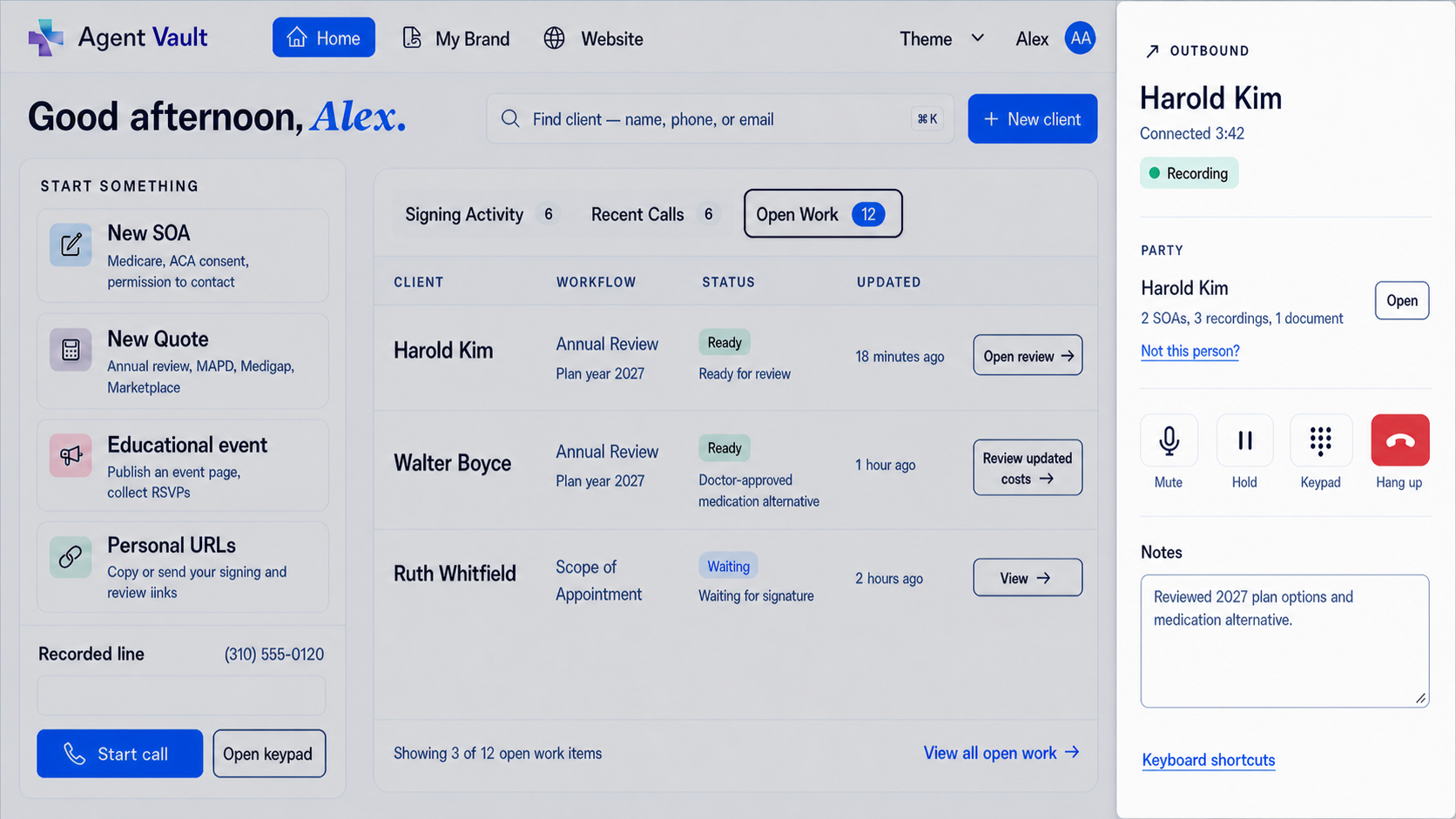
Business line and secure vault for Medicare and ACA insurance agents

Agent Compliance Vault + Recorded Business Line

Recorded Business Line and Compliance Vault for Medicare & ACA Agents

Get a dedicated recorded business line and a secure vault built for licensed insurance agents.

Use one workflow to handle insurance sales calls, capture call recordings, send electronic Scope of Appointment forms, support telephone SOA and voice signature workflows, store ACA consent records, and keep related sales documents together.

Whether you are preparing for AEP, working ACA enrollments, or organizing records year-round, Business Line + Vault gives you a cleaner way to handle the call and keep the record.

Automatic call recording Electronic SOA links Telephone SOA / voice signature ACA consent storage Telephonic enrollment records Export your records

Built for licensed agents. Use your own approved scripts, disclosures, carrier procedures, and enrollment workflows.

Why this exists

Your phone line should not be separate from your compliance records

A lot of agents can find a phone service that records calls. The harder part is what happens after the call.

You still have to save the recording, keep it organized, connect it to the right prospect or client, store related documents, and find everything later if a carrier, agency, CMS reviewer, or compliance team asks for it.

Business Line + Vault is built around that real workflow. You get a recorded business line for your Medicare and ACA sales calls, plus a secure vault where the records that matter can stay together.

The business line helps you handle the call. The vault helps you keep the record.

How it works

One vault for electronic forms, recorded calls, and sales records

Step 1

Choose your recorded business line

Pick a dedicated business number for Medicare and ACA sales calls. Use it for inbound calls, outbound calls, or recorded workflows where you need a cleaner record of the conversation.

Step 2

Send forms or capture the call

Send an electronic SOA or ACA consent link by text or email, or use your recorded line for telephone SOA, voice signature, or telephonic enrollment workflows when your process allows it.

Step 3

Let the client complete the record

The beneficiary or consumer can review and sign through a secure web form on their phone, tablet, or computer. For telephone workflows, the recorded call can capture the authorization or enrollment conversation.

Step 4

Store everything together

Keep call recordings, SOAs, ACA consent records, eligibility review documentation, telephonic enrollment records, uploaded files, and supporting sales documents in one secure vault.

Step 5

Retrieve or export when needed

When a record is needed, you are not digging through disconnected phone tools, PDFs, email threads, or desktop folders. Your records are organized in one account and can be exported if your workflow changes.

Use your own approved scripts, disclosures, carrier procedures, state recording notices, and enrollment workflows.

Electronic SOA

Electronic Scope of Appointment without chasing paper

Send a private Medicare Scope of Appointment link by text or email, and let the beneficiary review and sign from their phone.

This is not a static PDF you have to print, scan, or manually chase. It is a web-based signing workflow built for real sales situations: phone calls, office appointments, in-home meetings, event follow-up, and last-minute scope changes.

Agents can generate the SOA link, send it to the beneficiary, track whether it is pending or signed, and keep the completed record in the vault.

Electronic SOA workflow

Send SOA links by text or email
Beneficiary can sign from a phone, tablet, or computer
Track pending and signed status
Generate a new SOA when the product scope changes
Store completed SOAs with related call recordings
Keep records under your own agent account
Export records if you leave

When the conversation changes, your workflow should move with it.

If the beneficiary wants to discuss a different product type, create a new SOA and keep the updated record with the rest of the file.

Telephone SOA

Telephone SOA and voice signature workflows

Some appointments happen by phone. Business Line + Vault gives agents a recorded-line workflow that can support telephone Scope of Appointment and voice signature-style processes.

When your Medicare sales process allows a telephonic SOA, use the recorded line to capture the call, follow your required script, and store the recording in the vault with the related client record.

This gives you a practical alternative when an electronic signature link is not the best fit for the moment.

Use it for

Telephone Scope of Appointment calls
Voice signature-style authorization workflows
Recorded beneficiary acknowledgments
Follow-up calls where scope needs to be documented
Call records connected to SOAs and sales files

Agents remain responsible for using the scripts, disclosures, notices, and procedures required by their carrier, agency, state, and enrollment workflow.

Telephonic enrollment

Support telephonic enrollment recordkeeping

When telephonic enrollment is available through your approved enrollment process, the recorded business line helps you capture and store the call record.

Use your required enrollment script, disclosures, and procedures, then keep the recording with the related SOA, plan documents, ACA records, or supporting sales files.

The goal is simple: the enrollment conversation and the supporting records should not live in separate places.

Enrollment recordkeeping

Record enrollment-related calls through your business line
Store the call with related SOAs and documents
Keep telephone records organized by client or workflow
Reduce scattered files and disconnected call recordings
Export records if your business changes

ACA workflows

ACA consent and eligibility review records in the same vault

Medicare agents are not the only agents who need organized records.

For ACA workflows, use the vault to store consumer consent records, eligibility application review documentation, call recordings, and related Marketplace files.

Send consent workflows electronically, keep supporting documents together, and maintain a cleaner record of the assistance you provided.

ACA record types

ACA consumer consent records
Eligibility application review documentation
Marketplace-related sales files
Call recordings and supporting notes
Storage with your Medicare records
One account for Medicare and ACA workflows

CMS Marketplace materials state that agents and brokers must document consumer consent before providing enrollment assistance and document eligibility application review before submission; CMS materials also state those records must be maintained for at least 10 years and produced to CMS upon request.

Your workflow

Built for your scripts, your carriers, and your workflow

Business Line + Vault gives you the recorded line and recordkeeping infrastructure. It does not force you into one carrier script, one FMO workflow, or one enrollment platform.

Use the scripts, notices, disclosures, and procedures that apply to your business. Then use the vault to keep the record.

This is especially helpful for independent agents who work across products, carriers, or uplines and want their records under their own control.

Not ordinary VoIP

More than a phone line

Generic phone systems are built to make and receive calls. Business Line + Vault is built for insurance-agent recordkeeping.

Generic business phone line
Business Line + Vault
Gives you a number
Gives you a number built around agent workflows
May record calls
Records calls through a jurisdiction-aware workflow
Recordings may live separately
Recordings, electronic forms, and documents stay together
Not designed for SOAs or ACA records
Built for SOAs, ACA documentation, and telephonic records
Often tied to a larger phone stack
Lightweight workflow for independent agents
Records may be hard to move
Export your recordings and documents

Independent-agent control

Keep control of your records

Your calls, prospects, clients, SOAs, ACA records, and sales documents are part of your business.

Many independent agents do not want their compliance records trapped inside a carrier, FMO, CRM, quoting platform, or generic phone system. Business Line + Vault gives you a standalone place to keep the records that support your book of business.

Use it alongside your current quoting, enrollment, CRM, or agency tools. It is not designed to replace every system you use. It is designed to strengthen the phone and recordkeeping side of your workflow.

Compliance-aware

Designed to reduce compliance friction

Recording the call is only one part of a good compliance workflow.

Agents also need a practical way to organize records, keep related documents together, retrieve files when needed, and avoid scattering sensitive information across email inboxes, desktop folders, and disconnected tools.

Business Line + Vault helps you create a cleaner recordkeeping process. You still remain responsible for following applicable CMS rules, Marketplace rules, carrier requirements, agency policies, state recording-consent laws, privacy requirements, and your own compliance procedures.

Current Medicare call-recording context

CMS's CY2027 Medicare final rule changed marketing and sales call retention to a 6-year framework, with audio required for the first 3 years and audio or complete and accurate transcripts permitted for years 4-6. Enrollment records remain subject to separate retention requirements. Read the Federal Register rule.

Seasonal flexibility

Set up before AEP. Store records in the off-season.

AEP gets busy fast. Agents start preparing months before open enrollment because the last thing you want is to rebuild your phone and compliance workflow when prospects are already calling.

Business Line + Vault is designed for seasonal flexibility. Keep the full business line when you are actively selling. If you do not need the line year-round, downgrade to Vault Only in the slower season and keep access to your stored recordings and documents.

Use the full recorded business line when you need it
Downgrade to Vault Only in the off-season
Keep important records in your account
Reactivate the line when your selling season ramps back up
Cancel any time
Export your records if you leave

Pricing

Simple pricing for recorded calls, forms, and vault storage

Start with the recorded business line and vault. Downgrade only if it makes sense for your business.

Core offer

Business Line + Vault

$39.99

/month

For agents who want a recorded business line plus a secure vault for call recordings, electronic SOAs, telephone SOA records, ACA consent records, telephonic enrollment records, and sales documents.

  • Dedicated business line
  • Automatic call recording
  • Secure vault storage
  • Electronic SOA workflow
  • Telephone SOA / voice signature recordkeeping
  • ACA consent and eligibility review storage
  • Uploaded sales documents
  • Record export
  • Cancel any time
  • 30-day money back guarantee
Start Business Line + Vault

Off-season option

Vault Only

$9.99

/month

For agents who want lower-cost off-season storage or do not need the recorded business line year-round.

  • Continued access to stored records
  • Stored call recordings
  • Stored SOAs and ACA records
  • Uploaded documents
  • Record export
  • Off-season flexibility
Use Vault Only

Included account tools

Also included when they fit your workflow

Business Line + Vault is the core offer for agents who need a recorded line and organized compliance records.

Your agent account may also include other workflow tools, such as Medicare Blue Button access, Medicare plan-finder support, and ACA plan-finder tools. These can help when you want additional data or plan-review support, but they do not have to complicate the main workflow.

If all you need right now is a recorded business line and a place to keep records, start there.

FAQ

Frequently asked questions

Can I send an electronic Scope of Appointment by text or email? +

Yes. You can send a private SOA link by text or email. The beneficiary can open the link, review the form, and sign electronically from a phone, tablet, or computer.

Is the SOA a PDF? +

No. The electronic SOA workflow is a secure web form, not just a static PDF handoff. It is designed so the beneficiary can complete the form online.

Can I use this for telephone Scope of Appointment? +

Yes. When your workflow allows a telephonic SOA, you can use the recorded business line to capture the telephone SOA or voice signature-style authorization and store the recording in the vault.

What is a voice signature workflow? +

A voice signature workflow is a recorded telephone process where the beneficiary's authorization or acknowledgment is captured on the call. Business Line + Vault gives you the recorded line and storage workflow so the call record can be kept with the related sales documents.

Can I use this for telephonic enrollments? +

Yes. When telephonic enrollment is available through your approved enrollment process, you can use the recorded line to capture and store the enrollment call record with the related SOA and sales documents.

Do you provide the script? +

You can use your own approved scripts, carrier language, agency procedures, and required disclosures. The platform helps you record, store, and organize the records created through that workflow.

Can I create a new SOA if the product scope changes? +

Yes. If the beneficiary wants to discuss a different product type, you can generate a new SOA and keep the updated record in the vault.

Can I store ACA consent records too? +

Yes. The vault can store ACA consumer consent records, eligibility application review documentation, call recordings, and related Marketplace files.

Is this a business phone line or a compliance app? +

Both. It starts with a dedicated recorded business line for your Medicare and ACA sales calls. Your account also includes a secure vault for call recordings, SOAs, ACA records, telephonic enrollment records, and other sales documents.

Are calls automatically recorded? +

Yes. Calls handled through the recorded business-line workflow are automatically recorded and stored when recording is permitted and any required notice or consent workflow is satisfied. You should still use the required call recording notices, consent language, carrier scripts, and state-specific procedures that apply to your business.

Does this replace my CRM or quoting platform? +

No. Business Line + Vault is designed to work alongside your existing quoting, CRM, enrollment, and agency tools. It focuses on the recorded-line and compliance-record layer.

Can I export my records? +

Yes. Your recordings and documents can be exported if your workflow changes or you decide to leave.

What is the vault? +

The vault is the secure online record system inside your account. It stores your call recordings and lets you keep related compliance documents and sales records together.

How long do Medicare call recordings need to be kept? +

For CY2027, CMS finalized a 6-year retention framework for Medicare marketing and sales calls: audio for years 1-3, and audio or complete and accurate transcripts for years 4-6. Enrollment records remain subject to separate 10-year retention requirements. Always follow current CMS rules, carrier guidance, and your agency compliance policies.

Source: Federal Register, CMS-4208-F3 and CMS-4212-F

Does this guarantee compliance? +

No software can guarantee compliance by itself. Business Line + Vault gives you a workflow for recording, storing, organizing, and retrieving records. You remain responsible for using compliant scripts, making required disclosures, obtaining required consent, following state recording laws, and complying with CMS, Marketplace, carrier, agency, and privacy requirements.

Can I downgrade in the off-season? +

Yes. If you do not need the full business line year-round, you can downgrade to Vault Only and keep access to stored records.

Is Informed + Choice an insurance agency? +

No. Informed + Choice is not an insurance agency and does not sell insurance. The platform provides workflow software for licensed agents, agencies, and healthcare organizations.

For ACA Marketplace consent and application review requirements, see CMS Marketplace Consumer Consent and Compliance.

Start with a recorded business line built for insurance agents

Get a dedicated recorded business line, electronic SOA workflow, ACA consent storage, and secure record vault for your Medicare and ACA sales workflow.

Keep your calls, SOAs, telephone authorization records, ACA records, and sales documents together instead of scattered across disconnected tools.

30-day money back guarantee. Cancel any time. Export your recordings and documents if you leave.

Pricing | FAQ | Contact | Privacy | Terms

Informed + Choice is a workflow platform and does not claim Medicare, CMS, Marketplace, or carrier endorsement.

Start Business Line + Vault