Automatic when the resolved call permits it
When the agent and counterparty both resolve to one-party states and no stricter policy applies, the call can record without a customer-facing prompt.
Call recording software for insurance agents
Place and answer business calls inside Business Telephone, apply the recording path selected for the states involved, and keep the permitted recording with the related record.
Card required at checkout; one trial per NPN. Use the additional scripts, disclosures, carrier procedures, and campaign requirements that apply to your calls.
Sales file first
A generic phone system may be able to record calls. But insurance agents usually need more than a call log.
You may need to connect the call to a prospect or client, store a signed Scope of Appointment, keep ACA consumer consent and eligibility review documentation, upload supporting sales documents, or export the full record if you leave a platform, agency, FMO, or CRM.
That is why Informed + Choice connects the recorded business line to a secure agent vault.
Multi-state call recording
Agent Workspace evaluates each call using your configured state and the best available phone-location signal for the other party. Depending on that result, it can record automatically, play an upfront recording notice, or ask the caller to press 1 before recording starts.
When the states differ, the stricter evaluated recording path controls. When the other party's location cannot be resolved, the system avoids silent recording and uses a notice-first fallback while preserving any stricter rule from the agent's configured state.
When the agent and counterparty both resolve to one-party states and no stricter policy applies, the call can record without a customer-facing prompt.
The platform plays an upfront recording notice and captures evidence that the notice played before the recorded conversation continues.
The customer presses 1 before recording starts. If consent is refused or not captured, the call can continue unrecorded instead of being dropped.
Each call keeps a recording-policy trail showing the jurisdiction signals used, the path selected, any prompt played, consent timing when required, and when recording began. Additional CMS, FCC or TCPA, carrier, agency, and campaign disclosures may still apply.
Review state call recording lawsPractical workflow
Call recording software for agents should not leave you with scattered audio files, disconnected PDFs, and folders you have to rebuild during an audit or complaint response.
A call recording by itself may not be enough. Keep the call with the proof that explains what happened and why the record exists.
Setup clarity
Agents should not have to guess how call recording works. Agent Workspace is designed around a dedicated recorded number, a repeatable recording workflow, and a vault where the call can stay connected to the sales file.
Use the platform for the recorded-line and storage workflow. Use your approved scripts, disclosures, recording notices, consent language, carrier procedures, agency policies, and state-specific rules for the compliance process itself.
Setup 1
Choose a new recorded business number, or ask about bringing the number your clients already know.
Setup 2
Use that number for inbound or outbound Medicare and ACA sales workflows.
Setup 3
Follow your required recording notice, consent language, carrier script, agency procedure, and state-specific rules.
Setup 4
Calls handled inside Agent Workspace can be automatically recorded when recording is permitted and consent requirements are satisfied.
Setup 5
Store the recording with related SOAs, ACA consent records, eligibility review files, enrollment-related records, notes, and uploaded documents.
Setup 6
Retrieve or export the file when your business, carrier, agency, or compliance process requires it.
How it works
Step 1
Start with a dedicated business number for Medicare and ACA sales calls. Use it for inbound calls, outbound calls, telephone SOA workflows, voice signature-style authorizations, telephonic enrollment recordkeeping, and other recorded workflows when your process allows them.
Step 2
Use the scripts, disclosures, recording notices, consent language, carrier procedures, agency policies, and state-specific requirements that apply to your business. The platform gives you the recorded-line and storage workflow.
Step 3
Calls handled through the recorded business-line workflow can be automatically recorded and stored when recording is permitted and any required notice or consent workflow is satisfied.
Step 4
Keep Medicare call recordings, electronic SOAs, telephone SOA records, telephonic enrollment records, ACA documentation, uploaded sales documents, notes, and historical files together in the vault.
Step 5
When a record is needed, you should not have to search through a phone provider, email inbox, desktop folder, CRM notes, PDF downloads, and multiple enrollment platforms.
Medicare and ACA workflows
Insurance agents do not all sell the same way. Agent Workspace connects its CRM to the recordkeeping layer across phone sales, electronic SOA, telephone SOA, telephonic enrollment, and ACA Marketplace documentation workflows.
Use the recorded business line for Medicare sales calls where recording is part of your required process. CMS CY2027 rules created a six-year framework for Medicare marketing and sales call records, while enrollment records remain on a separate track.
Send a private electronic Scope of Appointment link by text or email. The beneficiary can review and sign from a phone, tablet, or computer.
Explore Electronic SOAWhen your Medicare sales process allows a telephone Scope of Appointment or voice signature-style workflow, use your recorded business line to capture the authorization and store the recording with the related file.
View Telephone SOA WorkflowsWhen telephonic enrollment is available through your approved enrollment process, your recorded business line can help capture and store the call record with related SOAs, plan documents, ACA records, and supporting files.
For ACA Marketplace workflows, store consumer consent records, eligibility review documentation, call recordings, and related Marketplace files in the same account you use for Medicare records.
Explore ACA Compliance VaultComparison
| Generic phone recording | Informed + Choice Agent Workspace |
|---|---|
| Call recording only | In-app business calling plus agent compliance vault |
| Call + SOA | Store call recordings with electronic SOAs and telephone SOA records |
| Call + ACA consent | Keep ACA consumer consent records with related call records |
| Call + eligibility review | Store eligibility application review documentation with the file |
| Call + enrollment record | Keep telephonic enrollment-related records with SOAs and plan documents when applicable |
| Exportable file | Export recordings and documents if your workflow, FMO, agency, CRM, or phone system changes |
| Off-season storage | Use Essentials for calling, forms, and broader record access; ask about plan changes before changing required record access |
Buyer due diligence
AEP is not the time to discover that recordings are hard to export, disconnected from SOAs, or controlled by a phone vendor, FMO, CRM administrator, or agency workflow you do not manage.
Before choosing a call-recording workflow, ask whether it can help you retrieve the full file, not just the audio.
One file
If you are comparing call recording storage solutions, focus on whether the audio stays connected to the client record and the documents that explain the call. A recording is useful only if you can find it when it matters.
That creates a practical risk: you may have the record somewhere, but not be able to produce the complete file quickly. Agent Workspace gives you one place to keep the phone recording and the related documentation together.
Independent-agent control
Your compliance records are part of your business. If you change CRMs, switch quoting tools, leave an agency, change FMOs, or simplify your tech stack, your records should not be trapped inside a system you no longer use.
Agent Workspace includes its own Medicare and ACA-specific CRM while continuing to work alongside required carrier, FMO, quoting, and enrollment tools. Recorded calls and organized records stay connected to the client history.
Seasonal flexibility
AEP is not the time to rebuild your phone and compliance workflow. Start Essentials before the season gets busy, and review your calling and record-access needs with our team before changing plans.
Connect calling to your client workflow.
Plan for the records you need to retain.
Call recording software and CRM
Essentials gives Medicare and ACA agents a business number for inbound and outbound calls inside the app, with permitted recording, history, notes, voicemail, storage, retrieval, and export. Essentials is $29.99/month after a 30-day free trial, with a card required at checkout and one trial per NPN.
Start your 30-day free trialEssentials: $29.99/month after a 30-day free trial. Card required at checkout; one trial per NPN.
Compliance-aware
No software can guarantee compliance by itself.
That does not mean the storage layer is generic. Supported vault records use WORM-style Object Lock controls, versioning, SSE-KMS encryption, artifact hashes, and audit events to help protect call recordings and related files from ordinary alteration or deletion during the retention period.
Informed + Choice gives you a workflow for recording, storing, organizing, retrieving, and exporting records. You remain responsible for following the rules and procedures that apply to your business, including CMS rules, Marketplace rules, carrier requirements, agency policies, state call-recording laws, privacy requirements, and your own compliance procedures. Review state call recording consent rules.
Use your own approved scripts, notices, disclosures, and enrollment workflows. The goal is not to replace your compliance process. The goal is to make the recordkeeping side easier to manage.
Who this is for
Compliance source notes
CMS CY2027 Medicare final rule: Medicare marketing and sales call records are subject to a six-year retention framework, with audio required for years 1-3 and audio or complete and accurate transcripts allowed for years 4-6. Read the Federal Register rule. See the Medicare call recording requirements guide.
CMS Marketplace materials: ACA Marketplace consumer consent and eligibility application review documentation must generally be maintained for at least 10 years and produced to CMS upon request. Read the CMS Marketplace compliance deck.
Informed + Choice is a workflow platform and does not claim Medicare, CMS, Marketplace, carrier, or government endorsement.
FAQ
Conversation recordings and voicemail saved to Vault use long-term audio storage configured for approximately 10 years. This differs from the 30-day personal voicemail inbox and from the legal retention rules for each record. Account access and export after cancellation follow your subscription terms.
The phone offering provides voice calls and voicemail. Two-way customer texting from the business number is not currently available. Form links and transactional notifications are separate workflows.
Use Essentials just for your phone, or use the rest of the workspace too. The price, signup and included phone features are the same.
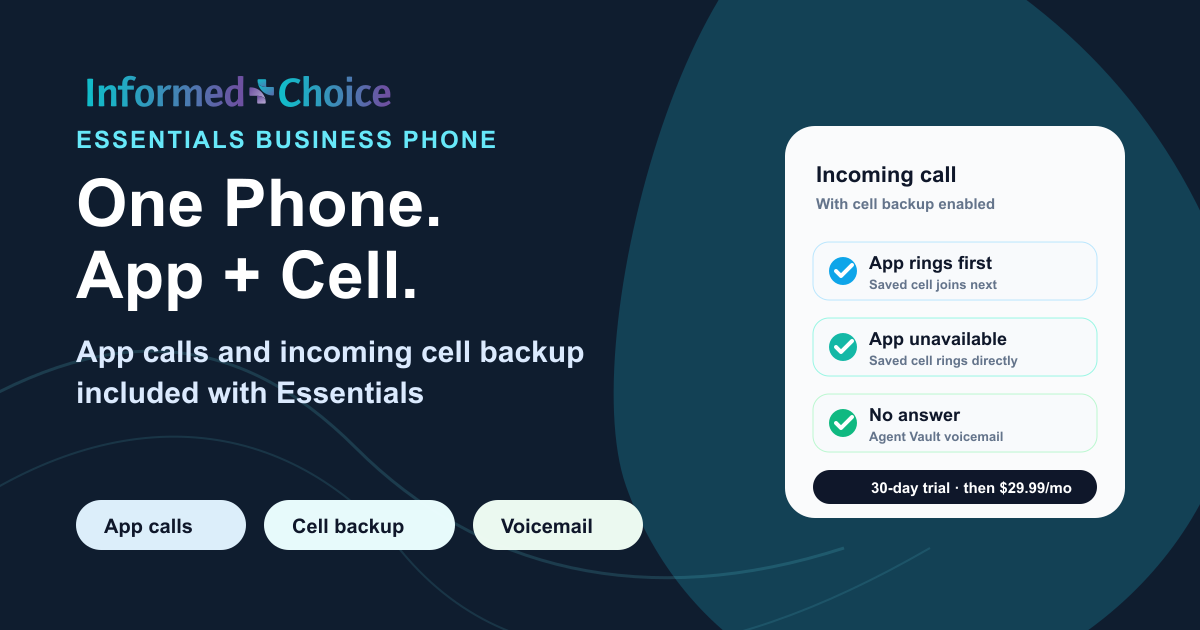
With cell backup on, incoming calls ring in the app first and your saved cell joins after a few seconds. If the app is closed or unavailable, your cell rings directly. Answer the cell call and follow the keypad prompt to connect.
Essentials is $29.99/month after a 30-day free trial. Card required at checkout; one trial per NPN. The trial includes 100 calling minutes; paid Essentials includes 1,500 calling minutes per month.
If neither the app nor your cell answers, the caller can leave Agent Vault voicemail. With cell backup off, unanswered or closed-app calls go to voicemail. New calls also go to voicemail while your business line is busy.
Listen to voicemail in Agent Vault and receive a new-message email. Unsaved personal-line voicemail is kept for 30 days. Use Save to Vault to keep a message with your long-term records.
Call recording for insurance agents is a workflow for capturing phone conversations with prospects, clients, beneficiaries, or consumers and keeping those recordings as part of the agent's sales or compliance record.
No. Essentials includes business calling alongside CRM, quoting, forms, and record-management workflows. Essentials is $29.99/month after a 30-day free trial. A card is required at checkout, with one trial per NPN.
Supported calls record according to the call policy: automatic recording, a recording announcement, or an affirmative keypad-consent step. When required consent is not given, the call is not recorded. Follow the approved scripts and procedures that apply to your work.
Review state call recording laws for insurance agents when building your recording notice and consent workflow.
The Recording Jurisdiction Engine uses the agent jurisdiction and available counterparty-location signals to choose an automatic, notice-first, or affirmative-consent path. Unknown or unresolved interstate calls do not silently auto-record. The selected policy, prompt, consent result, and recording behavior are captured with the call record.
Start your Essentials trial online, complete checkout, then set up calling. Choose a new business number or ask our team about porting an existing number, complete telephone onboarding, and use the permitted recording workflow configured for your account.
Make outbound calls with your browser microphone and answer incoming calls in the app. Incoming cell forwarding is included with Essentials: turn on cell backup to ring your saved cell number too.
When the consent gate applies and the caller does not provide affirmative keypad consent, recording does not start. The call can continue unrecorded, and the outcome stays with the call record. Follow your approved alternative process when the conversation itself must be recorded.
Calls handled through the recorded business-line workflow can be stored in the vault so the recording can stay with the related sales or compliance file instead of living only in a phone log. Supported recordings use retention-oriented Object Lock storage with versioning, SSE-KMS encryption, SHA-256 hashes, and CloudTrail audit events.
Medicare call-recording requirements depend on the type of call, the applicable CMS rules, carrier requirements, and the agent's workflow. For CY2027, CMS finalized a six-year retention framework for Medicare marketing and sales calls: audio for years 1-3, and audio or complete and accurate transcripts for years 4-6. Enrollment records remain subject to separate retention requirements.
For CY2027, CMS finalized a six-year framework for Medicare marketing and sales call records. Audio must be maintained for the first three years. For years four through six, records may be maintained in audio format or as complete and accurate transcripts. Enrollment records remain subject to separate retention requirements.
Yes. When an agent's workflow allows a telephone Scope of Appointment, the recorded business line can be used to capture the telephone SOA or voice signature-style authorization and store the recording in the vault.
Yes. You can send a private electronic SOA link by text or email. The beneficiary can review and sign from a phone, tablet, or computer. The completed SOA can stay with the related call recording and sales file.
Yes. The vault can store ACA consumer consent records, eligibility application review documentation, call recordings, and related Marketplace files.
Yes. Agent Workspace connects in-app calling and permitted recordings to the Medicare and ACA client record, notes, SOAs, consent records, enrollment-related files, and follow-up. Agents can continue using approved carrier, FMO, quoting, and enrollment tools where those workflows are required.
No. The engine selects the call-recording path and captures evidence of the notice or consent workflow it applied. Agents and agencies remain responsible for any additional CMS, FCC or TCPA, carrier, agency, campaign, privacy, and state-law language that applies to the call.
Yes. Recordings and documents can be exported if the agent changes FMOs, agencies, CRMs, phone systems, sales workflows, or decides to leave.
Essentials includes calling and broader workspace tools at $29.99/month after a 30-day free trial. Electronic SOA Vault is available separately at $9.99/month. Review your record access and calling needs with our team before changing plans.
No. Informed + Choice is not an insurance agency and does not sell insurance. The platform provides workflow software for licensed agents, agencies, and healthcare organizations.
No. No software can guarantee compliance by itself. Agent Workspace gives agents a workflow for recording, storing, organizing, retrieving, and exporting records. Agents remain responsible for following applicable CMS, Marketplace, carrier, agency, privacy, and state recording-law requirements.
Start Essentials for app calling, included incoming cell forwarding, permitted recordings, call history, storage, retrieval and export.
Essentials: $29.99/month after a 30-day free trial. Card required at checkout; one trial per NPN.
Recorded business line for insurance agents | Electronic Scope of Appointment | Telephone SOA and voice signature workflows | ACA Compliance Vault | Medicare agent software and agency tools
One phone product: Essentials
Use Essentials just for your phone, or use the rest of the workspace too. The price, signup and included phone features are the same.
Essentials is $29.99/month after a 30-day free trial. Card required at checkout; one trial per NPN. The trial includes 100 calling minutes; paid Essentials includes 1,500 calling minutes per month.
With cell backup on, incoming calls ring in the app first and your saved cell joins after a few seconds. If the app is closed or unavailable, your cell rings directly. Answer the cell call and follow the keypad prompt to connect.
If neither the app nor your cell answers, the caller can leave Agent Vault voicemail. With cell backup off, unanswered or closed-app calls go to voicemail. New calls also go to voicemail while your business line is busy.
Listen to voicemail in Agent Vault and receive a new-message email. Unsaved personal-line voicemail is kept for 30 days. Use Save to Vault to keep a message with your long-term records.
Keep call history, permitted recordings and notes together. Link calls to the correct client, and review unmatched calls before filing them with an SOA or other records.