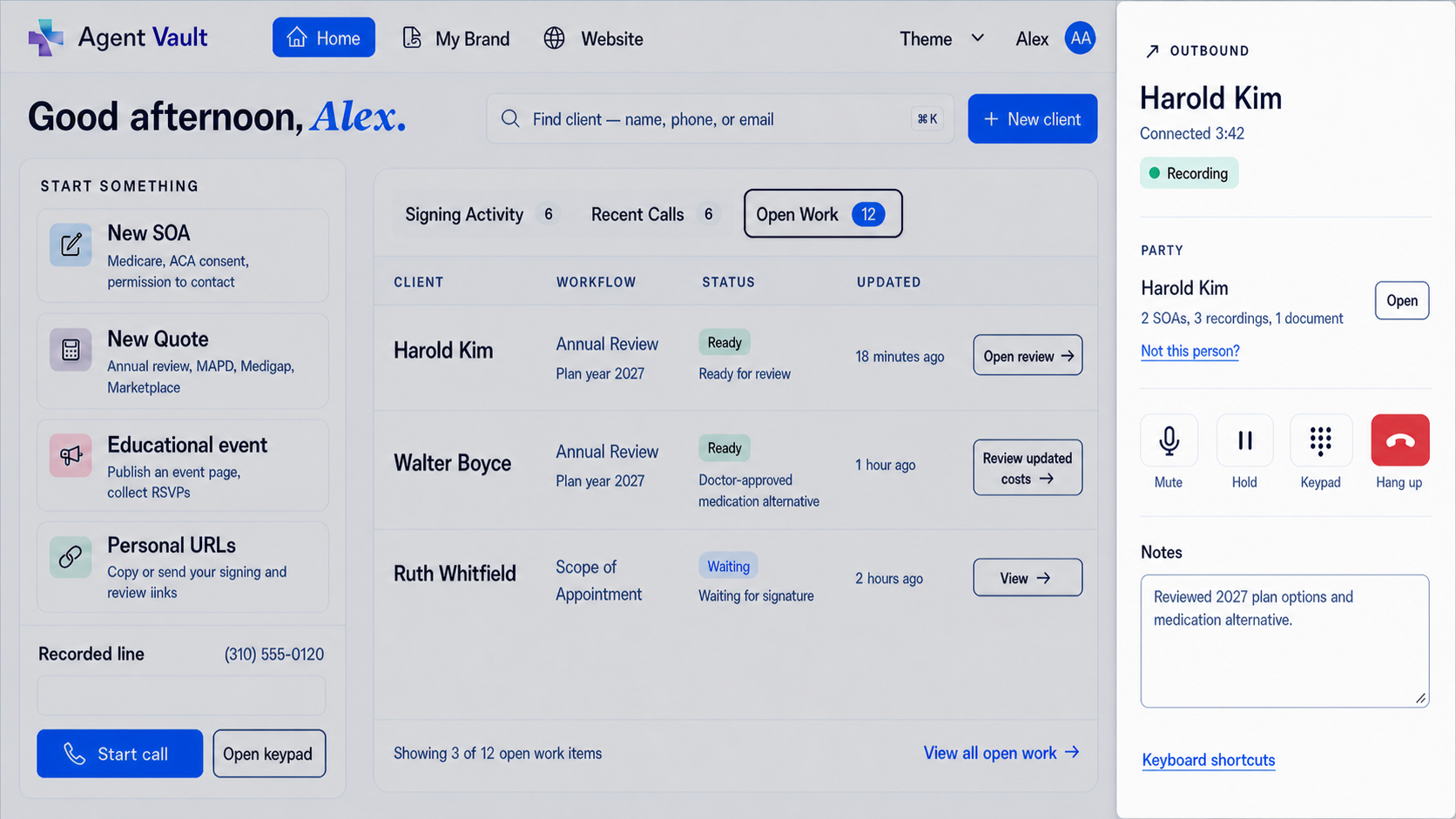
Recorded telephone SOA workflow for licensed Medicare agents

Telephone Scope of Appointment and Voice Signature for Medicare Agents

Some Medicare appointments happen by phone. Your SOA workflow should support that.

Informed + Choice gives licensed agents a recorded business line and secure vault for telephone Scope of Appointment records, voice signature-style authorizations, call recordings, telephonic enrollment records, and supporting sales documents.

Use your approved script. Capture the call. Store the recording with the related SOA and sales file.

Telephone SOAVoice signature workflowsRecorded business lineAutomatic call recordingSOA storageTelephonic enrollment recordsAgent-controlled vaultExportable records

Built for licensed agents using their approved scripts, disclosures, carrier procedures, state recording notices, and enrollment workflows.

Recorded line

Telephone SOA record

Stored

Call captured

Recorded business line

Script followed

Approved disclosures and procedure

Authorization recorded

Telephone SOA or voice signature

Vault record created

SOA, call, notes, documents

Agent-controlled vault

Capture, store, retrieve, export

Why telephone SOA matters

When the appointment happens by phone, the record should live with the file

Not every beneficiary wants to complete an electronic form. Not every appointment starts at a desk. Sometimes the most practical workflow is a recorded telephone process.

A telephone Scope of Appointment or voice signature-style workflow can help agents document the beneficiary's authorization by call, then keep that recording with the related Medicare sales record.

The problem is that many agents record calls in one system, store SOAs somewhere else, and keep supporting files in email, PDFs, folders, or carrier portals. Informed + Choice connects the recorded call to the vault.

Use Business Line + Vault to capture the telephone record and keep it with the SOA, enrollment file, notes, ACA documents, and other supporting sales records.

Capture the authorization

Use a recorded business line for telephone SOA or voice signature-style workflows.

Store the recording

Keep call recordings in your vault with related SOAs and sales documents.

Retrieve the proof

Find and export the record later for a carrier request, agency review, complaint response, or internal file check.

How it works

How telephone SOA and voice signature workflows work

Step 1

Use your recorded business line

Route the call through your recorded business line so the conversation can be captured and stored.

Step 2

Follow your approved script

Use the telephone SOA, voice signature, or enrollment script required by your carrier, agency, FMO, state, or enrollment workflow.

Step 3

Capture the beneficiary authorization

The recorded call can capture the beneficiary authorization, acknowledgment, or voice signature-style confirmation.

Step 4

Store the recording in the vault

Keep the recorded SOA or voice signature record with the related client file, electronic SOA, plan documents, uploaded files, or sales notes.

Step 5

Retrieve and export when needed

Open, download, or export the record when your business, agency, carrier, or compliance workflow requires it.

Telephone SOA

Telephone Scope of Appointment recordkeeping

A telephone Scope of Appointment workflow gives agents a practical way to document scope when the Medicare appointment happens by phone.

Instead of sending a separate PDF, waiting for a paper form, or storing the recording inside a disconnected phone tool, use your recorded line to capture the telephone SOA and keep it in your vault.

The result is a cleaner file: the call recording, related SOA, plan documents, notes, and supporting records stay together.

A telephone SOA is only useful if you can find it later.

Recorded telephone SOA workflow
Use your own approved SOA script
Capture beneficiary authorization by phone
Store the recording with the related client file
Keep telephone SOA records with electronic SOAs
Upload supporting documents
Export records if your workflow changes

Voice signature workflows

Voice signature-style workflows for Medicare records

Voice signature is a practical way to describe what many agents need: a recorded telephone process where the beneficiary's authorization or acknowledgment is captured on the call.

Business Line + Vault gives you the recorded line and storage layer for that workflow.

Use the script and procedure that applies to your business, then store the voice signature record in your vault with the related SOA, call recording, enrollment record, or supporting documents.

Add a recorded business line

Use voice signature workflows for

Telephone SOA authorization
Recorded beneficiary acknowledgments
Enrollment-related confirmations
Consent or authorization calls
Follow-up records connected to a Medicare sales file
Call records that need to be retrieved later

Telephonic enrollment

Store telephonic enrollment call records with the rest of the file

When telephonic enrollment is available through your approved enrollment workflow, the call record should not be separated from the rest of the sales file.

Use your required enrollment script and process, then keep the recording with the related SOA, plan documents, notes, uploaded files, and supporting records.

Business Line + Vault helps agents keep enrollment-related call recordings organized in the same vault used for telephone SOA, electronic SOA, ACA records, and sales documents.

The platform supports the recordkeeping workflow. Agents use the scripts, disclosures, and enrollment procedures required for their approved enrollment process.

Record enrollment-related calls through your business line
Store the call with the related SOA
Keep plan documents and supporting files together
Connect telephone records to the client file
Retrieve recordings for review or dispute response
Export records if your business changes

Two workflows

Use telephone SOA and electronic SOA together

Some beneficiaries prefer to sign a link. Others are easier to handle by phone.

Informed + Choice supports both workflows. Use electronic Scope of Appointment for Medicare agents when a private text or email link is the best fit. Use telephone SOA or voice signature-style recordkeeping when a recorded call is the better fit. Store both types of records in the same vault.

Workflow Best fit
Electronic SOA Beneficiary can complete a web form by text or email
Telephone SOA Appointment is handled by phone and the SOA is captured by recorded call
Voice signature Beneficiary authorization or acknowledgment is captured verbally
Business Line + Vault Agent wants automatic call recording and storage
SOA Vault Agent wants electronic forms, document storage, and record retrieval

Product scope changes

Create a cleaner record when the conversation changes

Medicare conversations can shift. A beneficiary may start by asking about one product type, then ask to discuss another. When that happens, agents need a practical way to document the updated scope and keep the record organized.

Use electronic SOA when a new form is best. Use a recorded telephone workflow when your process supports a telephone record. Store the updated record in the same vault with the original SOA, call recording, and sales file.

CMS's Medicare Communications and Marketing Guidelines state that a new SOA is required if the beneficiary requests information about a different plan type than previously agreed upon. Read CMS MCMG.
Keep original and updated scope records together
Store telephone SOA recordings with related files
Create replacement electronic SOAs when needed
Keep product-scope records connected to call history
Export the complete file later

Primary workflow

A recorded business line built for telephone SOA workflows

Business Line + Vault gives Medicare and ACA agents a dedicated recorded business line with automatic call recording and secure vault storage.

Use it for sales calls, telephone SOA records, voice signature-style workflows, telephonic enrollment records, and supporting documents.

This is more than ordinary phone service. It is a recorded-line workflow connected to your agent-controlled compliance vault.

Call workflow

Dedicated business number
Automatic call recording
Inbound and outbound call workflows
Recorded telephone SOA
Voice signature-style authorization
Telephonic enrollment call records

Vault workflow

Call recording storage
SOA storage
Uploaded documents
ACA consent records
Eligibility review files
Record export

Seasonal workflow

Use the recorded line during busy seasons
Downgrade to Vault Only when needed
Keep access to stored records
Reactivate when sales volume increases

Agent-controlled record storage

Keep telephone records under your control

Independent agents often use carrier portals, FMO tools, quoting platforms, enrollment systems, CRMs, phone vendors, email, and file-sharing folders.

Those tools may change as your business changes. Your telephone SOA records, voice signature recordings, enrollment call records, electronic SOAs, and sales documents should not be trapped in a system you may stop using.

Informed + Choice gives agents a standalone record layer for the files that support their book of business.

Use your existing tools for quoting and enrollment.

Use Informed + Choice to keep the record.

No FMO lock-in
No CRM bloat
No scattered call recordings
Store calls and SOAs together
Works with your current quoting and enrollment tools
Export records if your workflow changes
Keep access during the off-season

Security and retrieval

Secure storage is expected. Retrieval is what agents need later.

The value of a telephone SOA or voice signature record is not just that the call was recorded. The value is being able to find the record when you need it.

Business Line + Vault stores call recordings and related documents in a protected vault so agents can retrieve records without digging through disconnected phone systems, email threads, PDFs, or old CRM notes.

Protected vault

Keep sensitive agent records in an access-controlled account instead of scattered across personal folders and file-sharing tools.

Call recording archive

Store telephone SOA recordings, voice signature records, and enrollment-related calls with related sales documents.

Related document storage

Keep electronic SOAs, ACA records, uploaded PDFs, and supporting files in the same vault.

Search and retrieval

Find the call or document you need when a carrier, agency, client, or internal review asks for it.

Exportable records

Download and export your recordings and documents if you change tools, agencies, FMOs, or workflows.

Pricing

Simple pricing for recorded calls and vault storage

Business Line + Vault

$39.99/month

For agents who want a dedicated recorded business line with automatic call recording and secure vault storage.

  • Dedicated business line
  • Automatic call recording
  • Telephone SOA recordkeeping
  • Voice signature-style workflow support
  • Telephonic enrollment call record storage
  • Call recordings stored in your vault
  • Electronic SOA storage
  • ACA document storage
  • Uploaded sales documents
  • Record export
  • Cancel any time
Start Business Line + Vault

Vault Only

$9.99/month

For agents who want lower-cost storage, electronic forms, historical records, or off-season access without keeping the recorded line active year-round.

  • Stored call recordings
  • Electronic SOA records
  • ACA consumer consent records
  • Eligibility review documentation
  • Uploaded files
  • Historical record storage
  • Record export
  • Off-season flexibility
Start Vault Only

Comparison

Telephone SOA workflow vs. ordinary call recording

Generic phone systems can record calls. That does not mean they are built for Medicare SOA recordkeeping.

Informed + Choice connects the recorded call to the agent's compliance vault, so the telephone SOA, voice signature record, enrollment call, and supporting documents can stay together.

Ordinary call recording Informed + Choice Business Line + Vault
Records calls Records calls and stores them with related sales files
Recordings may live in a phone dashboard Recordings live in an agent-controlled vault
Not built around SOA workflows Built for telephone SOA and electronic SOA records
Documents live somewhere else SOAs, ACA records, PDFs, and call recordings stay together
Harder to retrieve complete files Designed for record retrieval and export
Often part of a larger phone stack Focused on agent compliance recordkeeping

Related agent workflows

Related agent compliance workflows

Electronic Scope of Appointment

Send a private SOA link by text or email, track pending and signed status, and store completed SOAs in your vault.

View Electronic Scope of Appointment

Business Line + Vault

Add a dedicated recorded business line with automatic call recording and vault storage.

View Business Line + Vault

FAQ

Telephone SOA and voice signature FAQ

What is a telephone Scope of Appointment? +

A telephone Scope of Appointment is a Medicare SOA workflow where the scope is documented by recorded call instead of a paper or electronic form, when that workflow applies to the appointment.

Can I use a recorded call for a telephone SOA? +

Yes. CMS materials recognize telephonic recording as a method of delivery for telephonic appointments, along with signed hard copy and electronically signed forms. Agents should use the scripts and procedures required by their carrier, agency, state, and enrollment workflow.

What is a voice signature workflow? +

A voice signature workflow is a recorded telephone process where the beneficiary's authorization, acknowledgment, or confirmation is captured on the call. Informed + Choice provides the recorded line and vault storage layer for that record.

Does the platform give me the script? +

The platform gives you the recorded line and record storage workflow. Agents can use their own approved scripts, disclosures, carrier language, agency procedures, and enrollment workflows.

Can I store voice signature recordings with SOAs? +

Yes. You can store voice signature recordings with related SOAs, call recordings, enrollment records, uploaded documents, and sales files.

Can I use this for telephonic enrollment records? +

Yes. When telephonic enrollment is available through your approved enrollment process, you can use the recorded business line to capture and store enrollment-related call records.

Can I also send electronic SOAs? +

Yes. Informed + Choice supports electronic SOA workflows separately. Use electronic SOA when a text or email signing link is best, and use telephone SOA when a recorded call workflow is best.

What happens if the beneficiary wants to discuss a different plan type? +

You can create a new electronic SOA or capture an updated telephone record, depending on your workflow, then store the updated record with the rest of the file.

Does the recorded line store calls automatically? +

Yes. Calls handled through the Business Line + Vault workflow are automatically recorded and stored in the vault.

Can I export my telephone SOA or voice signature records? +

Yes. Recordings and documents are designed to be exportable if your business, agency, FMO, CRM, or phone workflow changes.

Does this replace my CRM or enrollment platform? +

No. Informed + Choice is designed to work beside your existing quoting, CRM, carrier, FMO, agency, and enrollment tools. It focuses on the recorded-line and compliance-record layer.

Does this guarantee Medicare compliance? +

No software can guarantee compliance by itself. Informed + Choice provides recorded-line, storage, retrieval, and export workflows. Agents remain responsible for using the scripts, disclosures, notices, state recording procedures, carrier requirements, and enrollment workflows that apply to their business.

For official source context, see CMS's Medicare Communications and Marketing Guidelines and the Federal Register CY2027 MA and Part D final rule. Always follow current CMS rules, carrier guidance, state rules, and agency compliance procedures.

Telephone recordkeeping

Capture the telephone record. Keep it with the file.

Use a recorded business line for telephone SOA, voice signature-style workflows, telephonic enrollment call records, and Medicare sales conversations.

Store the recordings with electronic SOAs, ACA records, uploaded documents, and supporting sales files in one agent-controlled vault.

Built for licensed Medicare and ACA agents. Use your approved scripts, disclosures, state recording notices, carrier procedures, and enrollment workflows.

Add Recorded Business Line