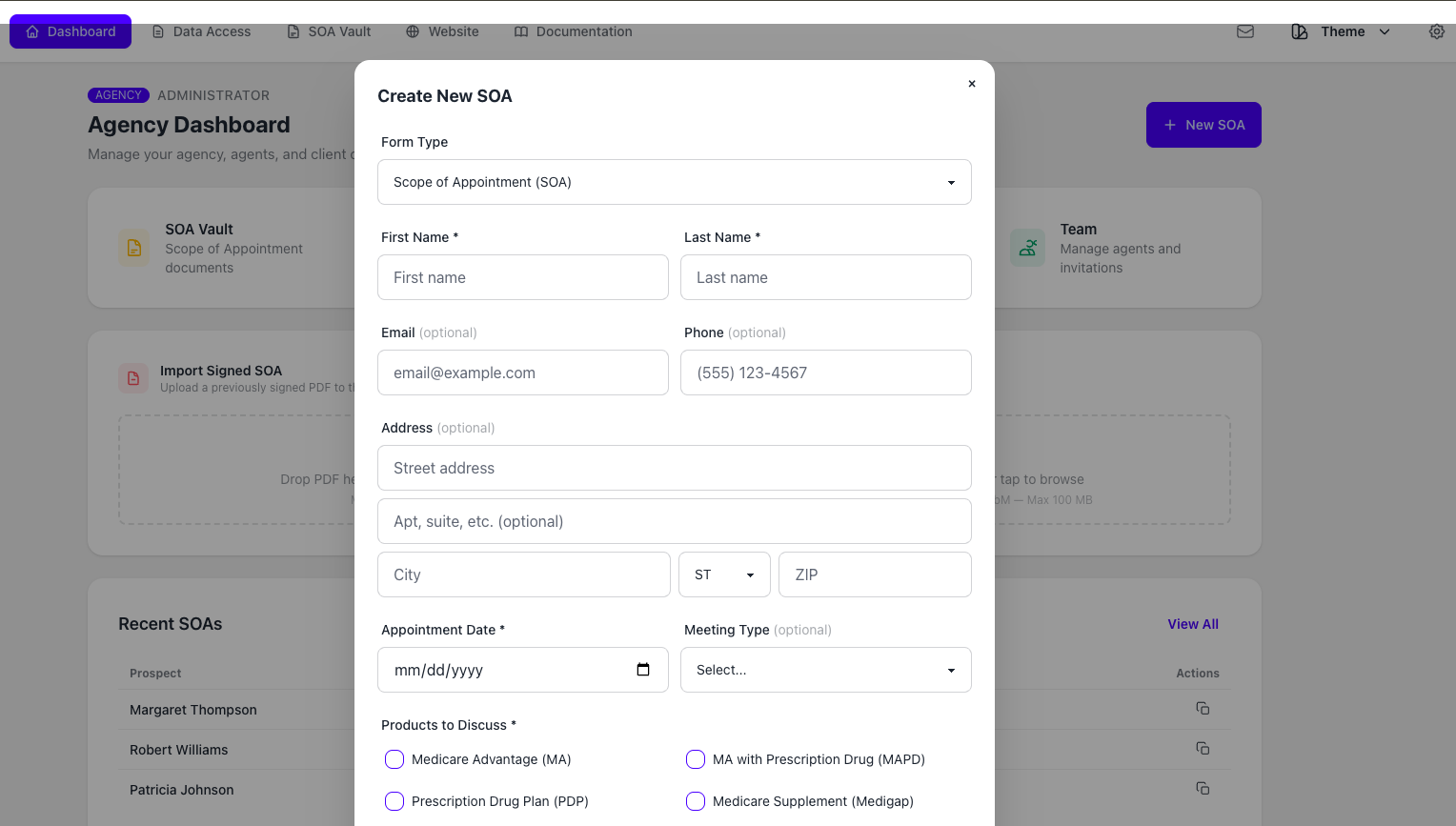
Create the SOA
Select the Medicare product types the beneficiary agreed to discuss and enter the appointment details.
Electronic SOA workflow for licensed Medicare agents
Send a private Medicare SOA link by text or email. The beneficiary signs from a phone, tablet, or computer with no app required. Track the record and keep the completed SOA in your agent-controlled vault.
$9.99/month · Cancel any time
Paid at secure checkout. No introductory trial.
The same Vault account also includes electronic ACA consumer consent and eligibility application review. No separate form subscription is required.
Online signing, tracking, and storage software for licensed agents — not a blank PDF download and not a quoting or enrollment platform.
Watch the individual-agent tour (3:00)Built for licensed agents using their approved scripts, disclosures, carrier procedures, and enrollment workflows.
Product demo
Preview the agent profile, branding, shareable links, electronic signing, and Vault in this individual-agent tour. See how the workflow looks before you start with Electronic SOA.
3 minutes · Silent video · Harbor demo account
Use fullscreen for a closer look at the product.
Open video in a new tabHow it works
Select the Medicare product types the beneficiary agreed to discuss and enter the appointment details.
Send a private link by text or email. The beneficiary signs in a browser from a phone, tablet, or computer with no app download.
See the record status, keep the completed SOA in your vault, and retrieve or export it when needed.
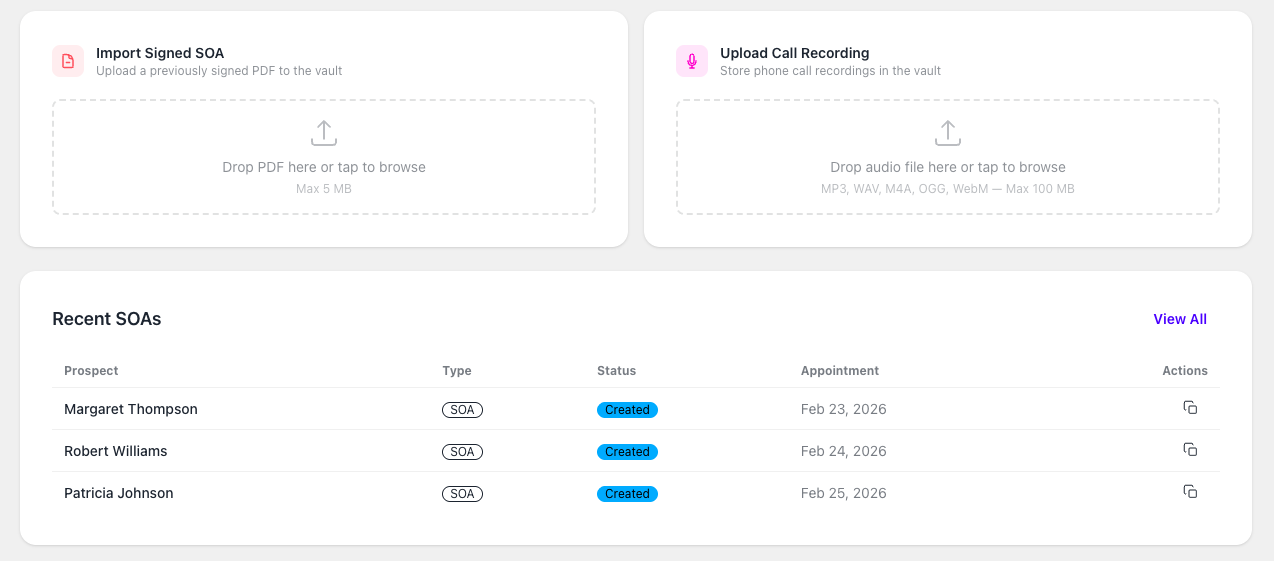
Actual product workflow
The agent workspace supports new electronic SOAs, imported signed SOAs, status visibility, and stored supporting records. Use it beside your existing quoting, CRM, carrier, FMO, and enrollment tools.
Create a private SOA link and send it by text or email.
See whether the SOA is pending or signed before moving into the product discussion.
Store the signed SOA in your vault with related notes, call recordings, ACA records, and supporting documents.
Record control
Many Medicare platforms offer electronic SOA features. The difference is where the record lives and whether you can retrieve or export it when your business changes.
| Embedded SOA inside another platform | Informed + Choice SOA Vault |
|---|---|
| SOA tied to a CRM, FMO, carrier, or quoting platform | SOA stored in your agent-controlled vault |
| May be hard to access after switching tools | Exportable records |
| Built around a larger system | Focused SOA and recordkeeping workflow |
| Call recordings may live elsewhere | Store SOAs with call recordings and documents |
| May not support your full Medicare and ACA record process | Medicare SOA, ACA consent, eligibility review, recordings, and uploads in one account |
CMS and carrier procedures
CMS does not make every agent tool automatically "approved" because the form is electronic. The workflow must properly document the Medicare product types the beneficiary agreed to discuss before the applicable personal marketing appointment.
Informed + Choice supports electronic SOA creation, online signing, storage, retrieval, and export. Agents remain responsible for the correct form language, disclosures, scripts, carrier procedures, FMO instructions, state rules, and enrollment workflows.
Source context: CMS Medicare Marketing Guidelines, 42 CFR 422.2264, and the CY 2027 final rule.
Scope of Appointment timing
The old 48-hour Scope of Appointment waiting period was one of the most confusing Medicare SOA requirements.
Effective June 1, 2026, CMS eliminated the fixed 48-hour wait between SOA completion and the personal marketing appointment. Agents no longer need to route every same-day appointment through a 48-hour exception analysis.
The compliance floor is still clear: the beneficiary may complete the SOA just before discussing plan products or in advance of a future appointment, but the SOA must be agreed upon and recorded before the personal marketing appointment proceeds. For in-person personal marketing appointments, the SOA must be in writing.
The SOA does not go away. The workflow gets faster.
Read the Scope of Appointment 48-hour rule updateReplacement SOA
Sometimes the conversation changes.
A beneficiary may start by asking about one Medicare product type, then ask to discuss another. Or the needs analysis may reveal that the original product scope is too narrow for the conversation the beneficiary now wants to have.
When the product scope changes, agents need a practical way to document the updated scope before moving into the new product discussion.
Informed + Choice lets you create a new electronic SOA, send it quickly, track whether it is signed, and store the updated record with the rest of the file.
The current Medicare Advantage regulation states that agents may not market additional health-related lines of plan business outside the agreed scope without a separate Scope of Appointment identifying the additional lines of business to be discussed.
Carrier-neutral workflow
A Scope of Appointment documents the product types the beneficiary agreed to discuss. It does not have to start with the final carrier recommendation.
In real Medicare sales, the final recommendation may change after you review doctors, prescriptions, network fit, LIS or Medicaid status, county plan design, benefits, service area, and enrollment timing.
That is where a carrier-neutral Scope of Appointment workflow helps. You capture the appointment scope first, store the record in your own vault, then use the correct carrier, FMO, CRM, or enrollment workflow after the final recommendation is clear.
This does not mean every carrier accepts every external SOA in every situation. It means the agent has an independent record layer for the appointment scope and can follow the final carrier's process from there.
Document the Medicare product types the beneficiary agreed to discuss before the plan-specific conversation begins.
Needs analysis may change the recommendation after you review doctors, prescriptions, network, benefits, service area, and eligibility factors.
Store the SOA in your own vault, then export it, upload it, attach it, or produce it upon request depending on the carrier workflow.
Not just a PDF
PDFs can work, but they often create extra steps. Someone has to download the file, open it, sign it, return it, and then the agent still has to store it somewhere.
Informed + Choice uses a web-based SOA workflow. The beneficiary opens a private link, reviews the form, signs electronically, and the completed record is stored in your vault.
Mobile-first
Medicare conversations do not always happen at a desk. You may be meeting a beneficiary in person, following up after an educational event, working from your phone, or handling a prospect who is ready to talk now but still needs the right SOA record before the discussion continues.
Create the SOA from your phone, tablet, or computer. Send the link by text or email. Let the beneficiary sign from their own device. Keep the completed record in your vault.
Send it from the field.
Get it signed online.
Keep the record in your vault.
Agent-controlled storage
The value of an SOA is not just that it was signed. The value is being able to find it later.
A carrier, agency principal, FMO, compliance reviewer, or beneficiary complaint may require you to produce the completed SOA, related call recording, appointment notes, and supporting sales documents.
Electronic SOA gives independent agents a focused place to keep completed Scope of Appointment records and the supporting SOA details created through that workflow.
Use your existing tools for quoting and enrollment. Use Electronic SOA for the signed SOA record; request an Essentials demo for broader ACA, CRM, file, and record-management needs.
Recorded-line connection
Electronic SOA is not the only way agents document appointment scope. Some workflows happen by phone.
Use electronic SOA when a signed online form is the best fit. Use Agent Workspace in-app calling when a telephone SOA, voice authorization, or telephonic record is the better fit.
With Agent Workspace, agents can store call recordings with the related SOA, telephone SOA record, ACA record, enrollment-supporting record, or sales file.
Use your approved scripts, required disclosures, recording notices, carrier procedures, agency policies, and state-law requirements. The platform stores and organizes the record; it does not decide which script or process is required for a specific carrier or state.
Pricing
$9.99/month
For agents who want electronic Scope of Appointment forms, online SOA signing, pending and signed status tracking, ACA document storage, historical record imports, and long-term vault access without the complete Agent Workspace.
Includes:
If you also need a dedicated business number for Medicare sales calls, telephone SOA workflows, voice authorization records, or telephonic enrollment calls, Business Telephone is coming soon at $39.99/month. Join early access for launch availability.
See recorded business line for Medicare agentsRelated workflows
FAQ
An electronic Scope of Appointment is a digital Medicare SOA workflow that lets the beneficiary review and sign the Scope of Appointment online instead of signing a paper form. Informed + Choice lets agents send a private SOA link by text or email, track completion, and store the completed record in an agent-controlled vault.
Yes. Agents may call it an electronic SOA, online Scope of Appointment, digital SOA, web-based SOA, or online Medicare SOA form. The goal is the same: document the product types the beneficiary agreed to discuss before the applicable Medicare personal marketing appointment.
Yes. You can create a private SOA link and send it by text or email. The beneficiary can open the link and complete the form from a phone, tablet, or computer.
No. The beneficiary can complete the signer-facing form from a browser on their phone, tablet, or computer.
No. The signer uses a web-based form workflow. After the beneficiary signs, the completed SOA can be stored in your vault.
Yes. The workflow is designed so agents can track whether the SOA is still pending or has been completed.
For Medicare Advantage and Part D personal marketing appointments, the Scope of Appointment must be agreed upon and recorded before the appointment begins. Effective June 1, 2026, CMS eliminated the fixed 48-hour waiting period, but the SOA requirement remains. Agents should also follow carrier guidance, state rules, and compliance procedures that apply to the workflow.
No. CMS eliminated the fixed 48-hour waiting period effective June 1, 2026. The beneficiary and plan, agent, or broker still need to agree upon and record the scope before the personal marketing appointment proceeds, and in-person personal marketing appointments require a written SOA.
CMS does not automatically approve every agent software tool simply because the form is electronic. The workflow must properly document the required appointment scope, and agents must follow current CMS rules, carrier procedures, FMO instructions, state rules, and approved scripts. Informed + Choice supports electronic SOA creation, signing, storage, retrieval, and export.
The current eCFR language states that the documented scope or request is valid for 12 months from the beneficiary signature date or initial request for information for the products identified. Agents should not treat that as blanket permission to discuss anything at any future appointment. If the product scope changes, create a new SOA.
Create and send a new SOA or replacement SOA before moving into the new product discussion. Store the updated record with the original file so the appointment history stays together.
Often, the SOA is about the product types the beneficiary agreed to discuss, not the carrier you eventually recommend. That is why a carrier-neutral Scope of Appointment workflow can be useful. Capture the product scope first, then store, export, upload, attach, or produce the SOA depending on the final carrier's rules. Do not assume one externally generated SOA is accepted by every carrier in every workflow.
Sometimes a carrier workflow may allow the agent or agency to retain the SOA and produce it upon request. Other workflows may require upload, attachment, or a carrier-specific process. SOA Vault gives you an agent-controlled place to store the record either way.
Electronic SOA works alongside telephone SOA and voice authorization workflows. If you need recorded calling, Business Telephone is coming soon at $39.99 per month. Inbound and outbound calls happen inside the app, and supported recordings can stay with the related records.
No. Informed + Choice is designed to work beside your current quoting, CRM, FMO, carrier, and enrollment tools. It focuses on the SOA and recordkeeping layer.
Yes. Records are designed to be exportable if your business changes or you move to another CRM, FMO, agency, carrier workflow, phone system, or enrollment platform.
No software can guarantee compliance by itself. Informed + Choice provides electronic form, storage, retrieval, and export workflows. Agents remain responsible for using the scripts, disclosures, notices, carrier procedures, state rules, and enrollment workflows that apply to their business.
For official source context, see 42 CFR 422.2264 and the CY 2027 final rule. Always follow current CMS rules, carrier guidance, state rules, and agency compliance procedures.
Start with the signed record
Create electronic SOAs, send private links by text or email, track pending and signed status, and store completed records in your agent-controlled vault.
Start Electronic SOA now for $9.99/month. Business Telephone is coming soon at $39.99/month, and the broader Essentials workspace is available through a guided demo.