Medicare Annual Review for licensed agents

Review more plans without guessing—or trusting an AI plan picker.

Collect the client's medications, pharmacy, doctors, current-plan context, and eligibility facts once. Then calculate and organize the eligible plans for a documented agent review.

The system follows defined calculation rules and keeps source evidence, assumptions, missing facts, and tradeoffs visible. It does not use an AI bot to tell you which plan to choose.

Blue Button, photos, or manual entryAutomatic drug calculationsProvider searchAgent makes the decision

Annual Review workbench

Plan assessment ready

2027 • 68 plan rows reviewed

Calculated
Group A 7

Matched

Group B 6

One gap

Group C 4

Tradeoffs

Group D 1

Unchecked

Plan example 01

$2,148 estimated annual total

All confirmed requirements matched

Plan example 02

$2,276 estimated annual total

Selected pharmacy needs review

Current plan

$2,512 estimated annual total

Pinned as comparison baseline

Illustrative product workflow. Estimates depend on source availability, confirmed inputs, geography, year, eligibility, and calculation assumptions.

The agent's time problem

The hard part is not finding plans. It is checking the whole client against all of them.

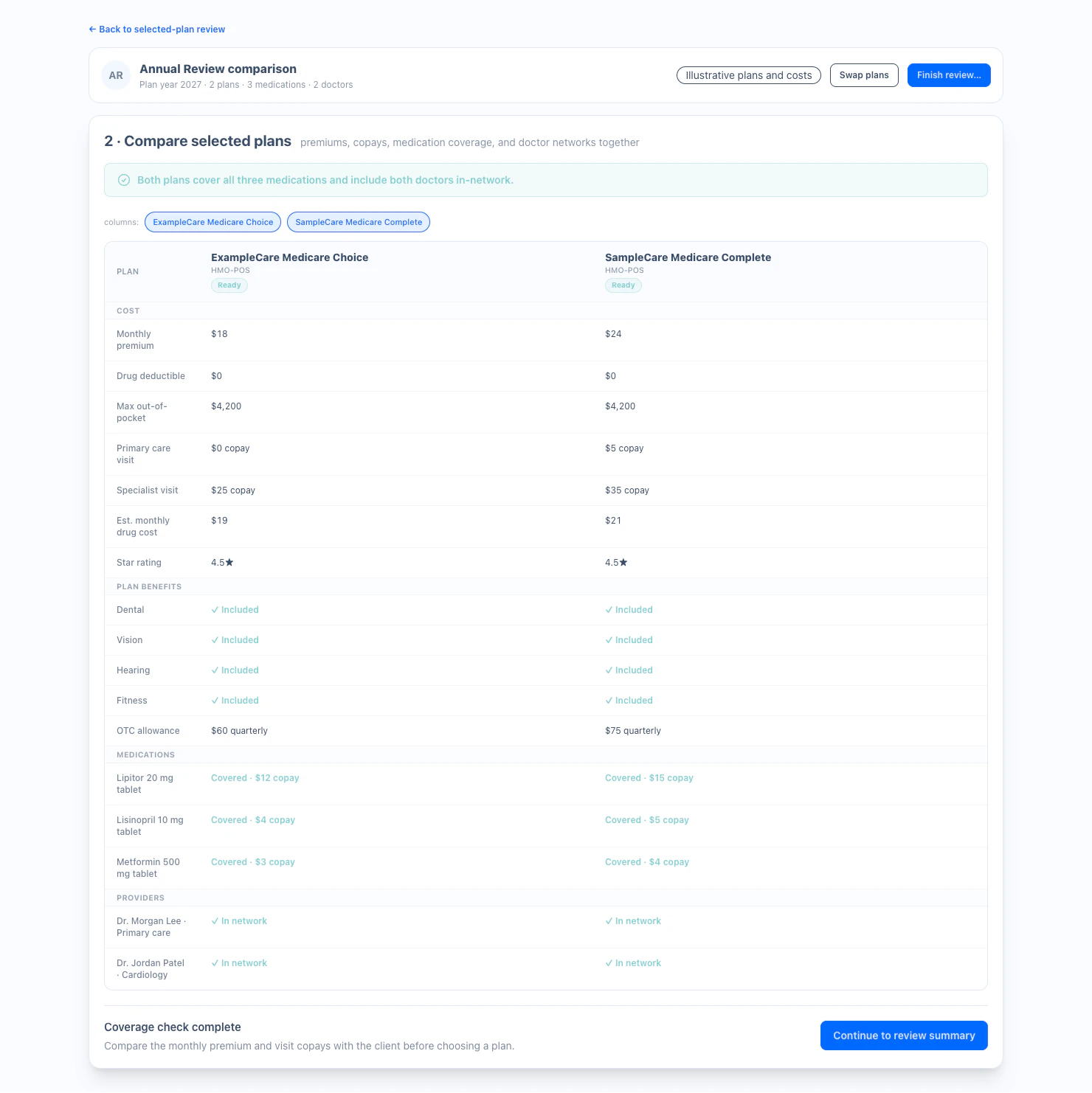
A meaningful review can involve medications, dosages, formularies, tiers, restrictions, pharmacy networks, deductibles, premiums, doctors, facilities, eligibility, current-plan changes, and next-year availability.

Doing that one plan at a time is slow, and a flat quote list can hide the reason one option fits while another needs attention.

Annual Review turns one confirmed client case into a consistent, evidence-backed assessment across the eligible plan set.

Three ways to begin

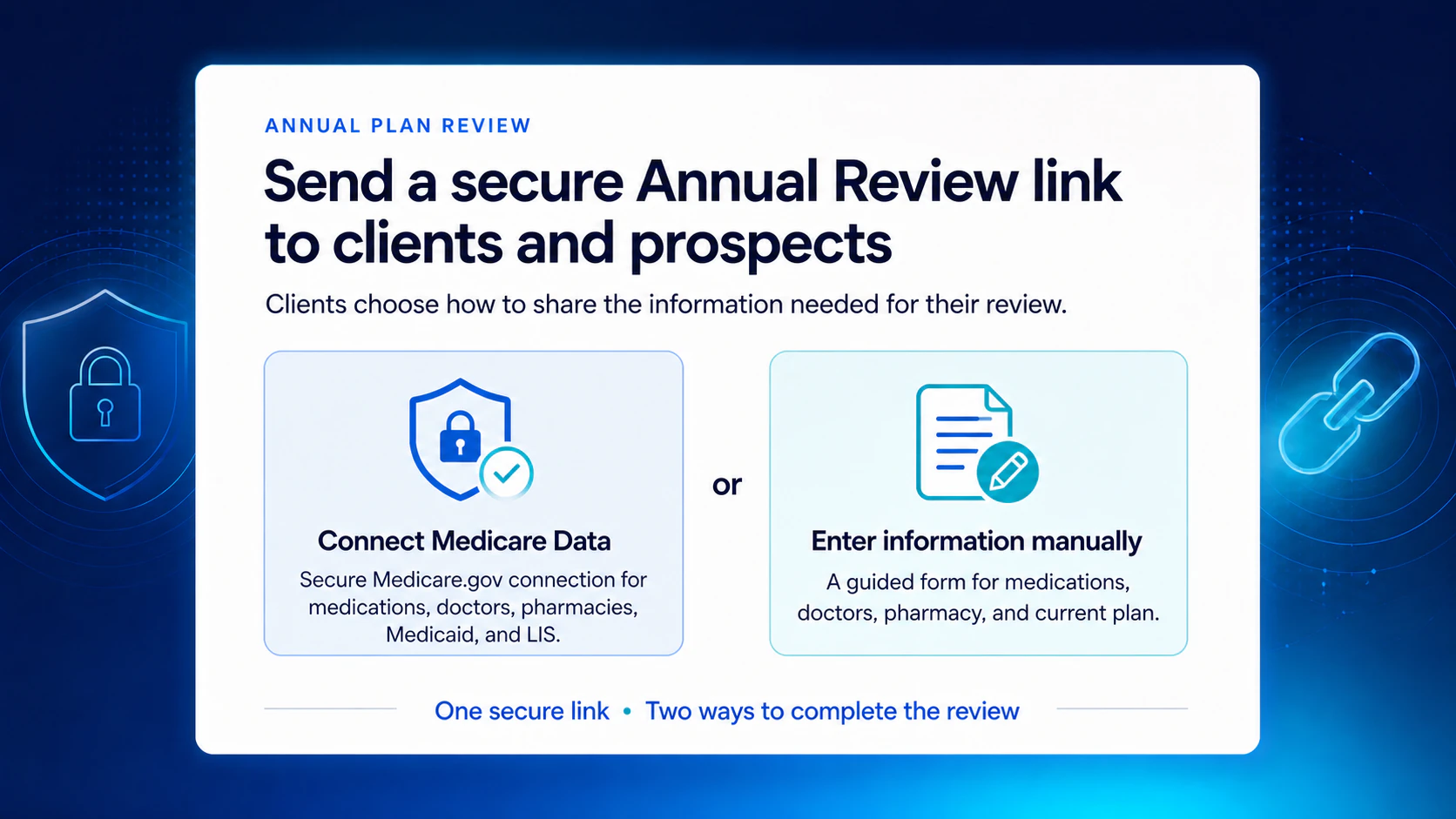
Let the client choose the easiest intake path

Every option ends at the same checkpoint: a structured case that the client or agent has confirmed.

01

Connect Medicare data

With the client's authorization, import available claim and prescription history so the client does not have to rebuild the starting list from memory.

Fastest path when the client is comfortable connecting Medicare data.

02

Photograph prescription bottles

The client can take photos of prescription bottles. Text extraction prepares a structured list for confirmation before the assessment runs.

AI may assist with reading bottle text; it does not calculate or choose the plan.

03

Enter information together

Use a guided workflow to add medications, dosage, frequency, pharmacy, doctors, current plan, and eligibility facts by hand.

A complete fallback when a data connection or photos are not preferred.

The calculation boundary

Defined rules in. Explainable results out.

Inputs are normalized, calculation rules are versioned, and evidence stays attached to the assessment. Unknown source data is not silently converted into a match.

01

Medication fit

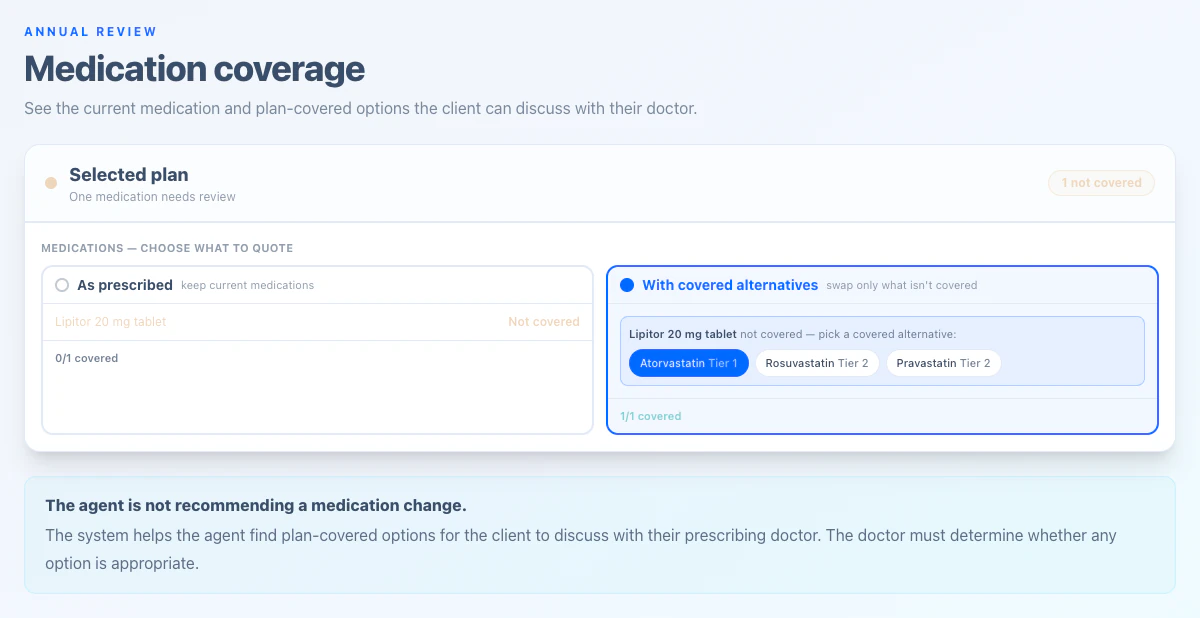
Formulary status, tier, prior authorization, step therapy, quantity limits, and severe unresolved warnings.

02

Drug cost

Plan-specific pricing assumptions, deductible and coverage-phase rules, pharmacy scenario, and applicable insulin or vaccine treatment.

03

Plan cost

Premium and estimated annual cost under the same confirmed medication and pharmacy assumptions.

04

Pharmacy fit

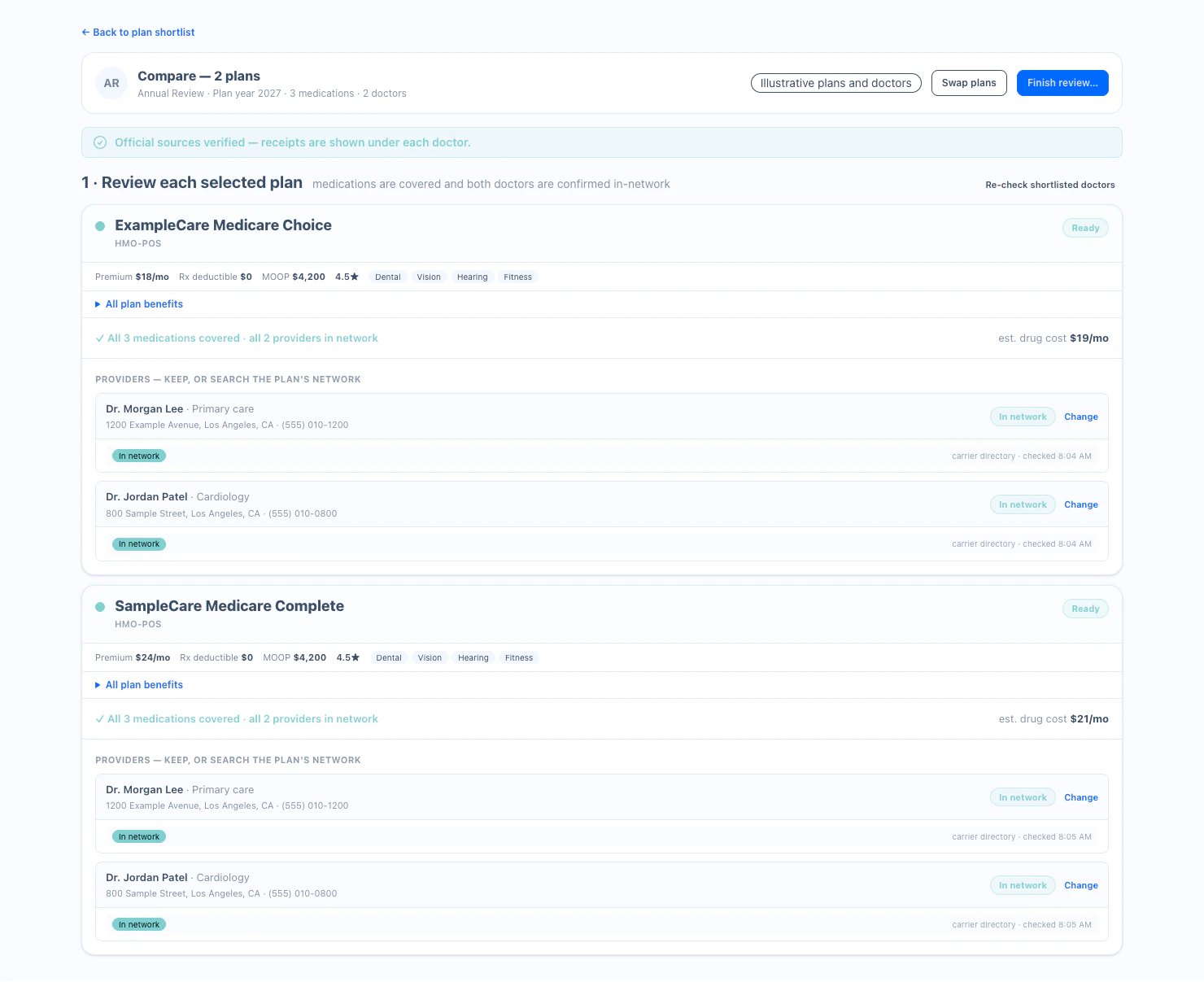
Whether the selected exact pharmacy is in network and how that assumption affects the comparison.

05

Provider fit

Available source evidence for must-keep doctors and facilities on MA or MAPD plans; unknown results stay unknown.

06

Eligibility fit

Known Medicare, Medicaid, LIS or Extra Help, geography, year, and plan-type facts used to filter or flag plan rows.

From ranking to review

See which plans match—and exactly where the others need attention

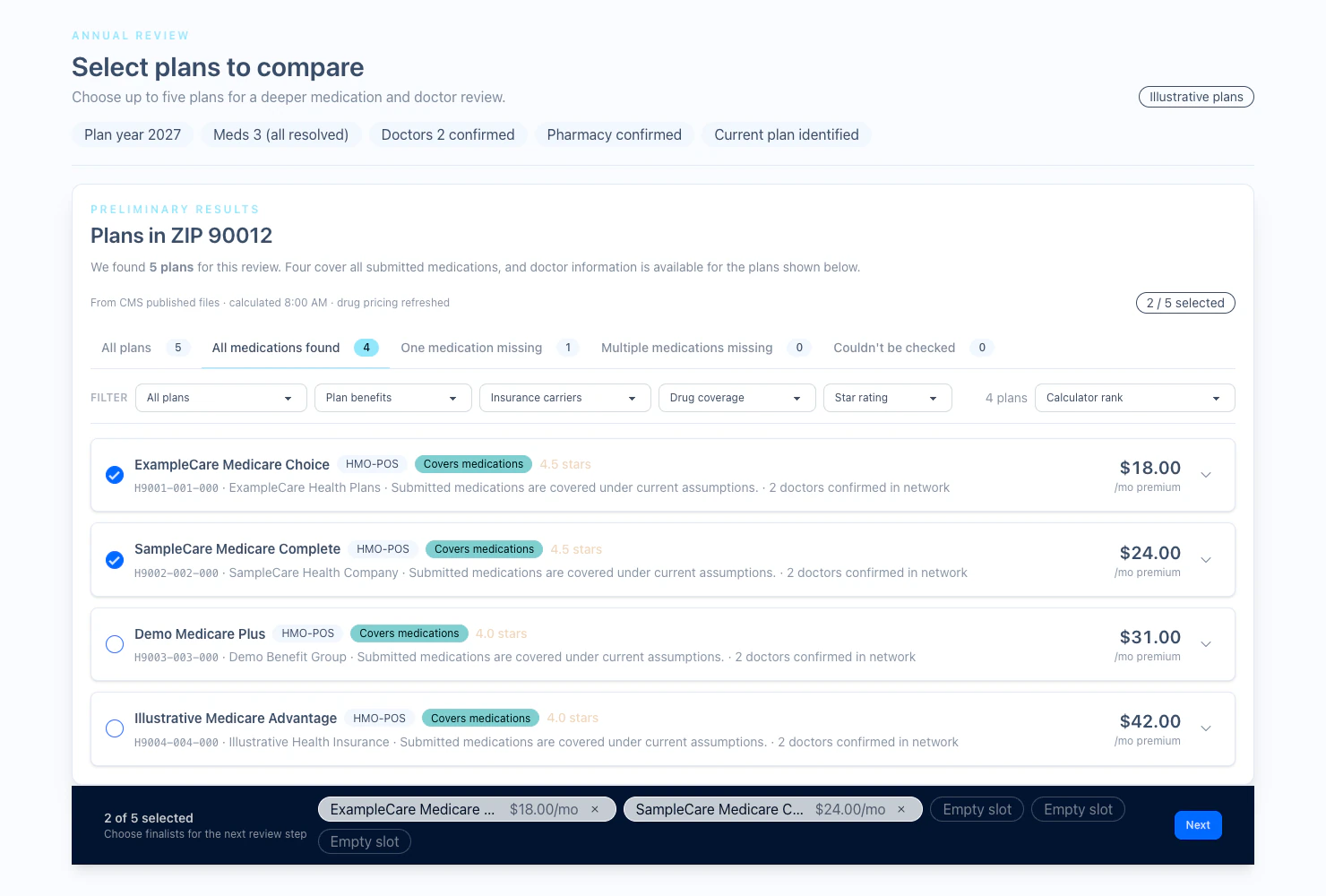
The plan groups are not recommendations. They organize the result by requirement fit so the agent can spend time on the meaningful differences.

Group A

Requirements matched

Submitted and confirmed requirements are affirmatively satisfied under the current assessment assumptions.

Group B

One requirement needs review

One material fit dimension is missing, unknown, or does not match and needs an agent's attention.

Group C

Multiple tradeoffs

Two or more material fit dimensions need review, but the plan can still be useful for the agent's comparison.

Group D

Not available or could not be evaluated

The plan is unavailable for the selected year or area, conflicts with known facts, or lacks enough source data to assess honestly.

The current plan stays visible as a comparison baseline when available. Costs and signed differences are shown only when the underlying estimates are comparable.

Why this changes the review

One confirmed case instead of repeated plan-by-plan detective work

Medication collection

Manual:Re-enter each list while the client waits

Annual Review:Connect Medicare data, use bottle photos, or enter manually

Plan review

Manual:Open plans one at a time and rebuild the same checks

Annual Review:Calculate the eligible set from one confirmed case

Cost comparison

Manual:Collect figures from separate plan screens

Annual Review:Use consistent assumptions across plan rows

Missing facts

Manual:Easy to overlook or treat as a negative result

Annual Review:Keep unknown or unavailable evidence visibly unresolved

Plan choice

Manual:Agent interprets scattered screens

Annual Review:Agent reviews grouped plans, evidence, costs, and tradeoffs

Record of the work

Manual:Notes, screenshots, and downloads in separate places

Annual Review:Versioned assessment and evidence connected to the client record

Two ways to use Annual Review

Choose the ongoing Workspace or Annual Review by itself

The Annual Review workflow is the same. Choose based on whether you also want the CRM, phone, personal forms, website, events, quoting, and 10-year Vault connected throughout the year.

Best value for ongoing client work

Agent Workspace

$39.99/month

Annual Review plus CRM, recorded Business Line, Medigap and Marketplace quoting, personal website and educational events, personal SOA and ACA links, MFA, and the searchable 10-year Vault.

Start Agent Workspace - $39.99/month

Available now. Month-to-month individual account.

Keep your current technology stack

Standalone Annual Review

$99.99/month

Get Blue Button, prescription-photo and manual intake, automatic drug-cost calculations, provider search, plan evidence, and the rules-based review workflow without moving your CRM or phone.

Choose Standalone Annual Review

Available today. Month-to-month.

Annual Review FAQ

The questions that matter before an agent relies on the result

Is the Medicare Annual Review calculated by AI?

No. An AI bot does not calculate the assessment and does not choose a plan. The calculation follows defined rules using plan, formulary, drug-pricing, pharmacy-network, provider, benefit, geography, year, and eligibility facts. AI-assisted text extraction may help read a prescription bottle photo, but the medication list is confirmed before the rules-based assessment runs.

Does Annual Review recommend a plan?

No. It calculates and organizes the evidence for licensed-agent review. Plans are grouped by how the submitted and confirmed requirements fit, with costs, assumptions, warnings, and unresolved evidence kept visible. The licensed agent reviews the choices and makes the decision with the client.

What if the client does not want to connect Medicare data?

They can use prescription bottle photos or complete the guided medication and provider workflow manually. All three paths converge on the same confirmed case before the assessment runs.

Does a bottle photo go straight into the plan calculation?

No. Photo text extraction prepares a structured medication candidate. The client or agent confirms the medication details before they become calculation inputs.

What happens when provider or pricing data is unavailable?

The workflow does not turn an unknown result into a positive match. Missing or unavailable evidence stays visible, and plans can move into a needs-review or could-not-be-evaluated group depending on the material gap.

Is Annual Review included in Agent Workspace?

Yes. Medicare Annual Review is included in the available $39.99-per-month Agent Workspace with CRM, recorded calling, agent website and events, electronic forms, and long-term record storage.

Can I buy Annual Review without Agent Workspace?

Yes. Standalone Medicare Annual Review is available for $99.99 per month. It includes Blue Button, prescription-photo and manual intake, automatic prescription-drug calculations, provider search, plan evidence, and the rules-based review workflow without requiring you to move your CRM or phone system.

Why is Agent Workspace less expensive than standalone Annual Review?

Agent Workspace is the best-value path for agents who want an ongoing CRM-centered system. The $99.99 standalone option is for agents who want the intensive Annual Review workflow while keeping their existing CRM, phone, website, and forms. Both options are month-to-month.

Does this replace Medicare.gov or carrier-approved enrollment tools?

No. Annual Review supports intake, assessment, comparison preparation, and recordkeeping. Agents still use the official, carrier, quoting, and enrollment tools required for their licensed sales workflow.

Prepare for the next review season

Give the agent more time to explain the choices.

Let the system collect and calculate the repeatable facts. Keep the licensed agent responsible for the conversation, the evidence, and the decision.

Estimates depend on confirmed inputs, source availability, geography, year, eligibility, and calculation assumptions. Informed + Choice does not sell insurance or make the licensed agent's plan decision.

Choose Annual Review Plan