Outbound
Start from the client workflow
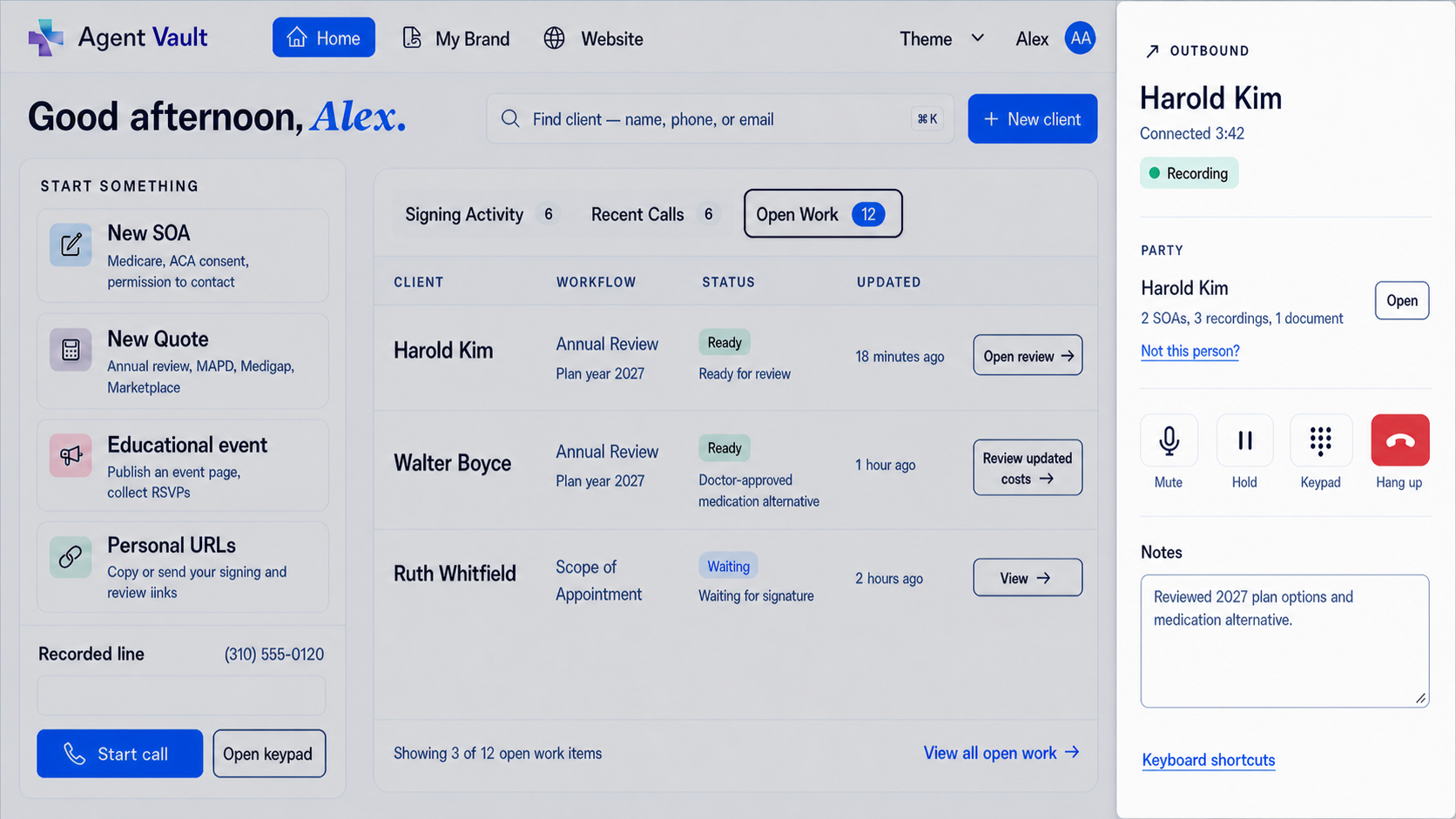
Use the business number, browser microphone, and in-app mute, hold, keypad, notes, and hang-up controls.
Business phone decision for Medicare and ACA agents
Traditional VoIP centers a broad phone system. Business Telephone focuses inbound and outbound calling around the insurance-agent workflow.
Make calls with the browser microphone. Answer calls in the app. Keep business calls off your personal cell service. Connect telephone history, permitted recordings, voicemail, and related records.
Calling is included with Essentials: $29.99/month after a 30-day free trial. Card required at checkout; one trial per NPN.
The short answer
Choose traditional VoIP when broad phone administration, devices, routing, messaging, contact-center capabilities, or an existing integration are the priority. Choose Agent Workspace when the business line should sit inside the Medicare and ACA CRM, forms, reviews, public website, educational events, voicemail, and client evidence.
The old phone setup is gone
Agent Workspace now handles both sides of the business call inside the app. Outbound calls use the browser microphone and call controls. Inbound calls ring while the agent is signed in and available.
Outbound
Use the business number, browser microphone, and in-app mute, hold, keypad, notes, and hang-up controls.
Inbound
The call rings in the Workspace while the app is open, the agent is signed in, and the agent is available.
Unavailable
Closed-app, unanswered, and busy calls go to Agent Vault voicemail instead of a personal cell phone.
Side-by-side
| Decision point | Traditional VoIP | Agent Workspace Business Line |
|---|---|---|
| Primary job | General business communications across voice, devices, users, messaging, and routing | Focused business calling for Medicare and ACA agents |
| Where calls happen | Usually desk phone, mobile app, desktop app, browser, or a mix depending on the provider | Inbound and outbound calls happen inside the Business Telephone web app |
| Personal cell service | Forwarding and mobile calling options are common | No cell forwarding or callback bridge; calls stay in the Business Telephone app |
| Existing phone number | Number porting may be part of the provider setup | Ask our team about bringing the cell or business number clients already know |
| Missed inbound calls | Depends on the provider's routing and voicemail setup | Unanswered, closed-app, and busy calls go to Agent Vault voicemail |
| Call recording | Automatic or on-demand recording varies by provider, plan, and configuration | Policy-controlled recording when permitted and required notice or consent is complete |
| Client context | May require a CRM integration or manual note process | Call history, notes, voicemail, and permitted recording connect to the client record |
| Agent workflows | Normally requires integrations for client and compliance context | Telephone history, voicemail, permitted recordings, and related records stay together |
| Best fit | A team needs broad phone-system capabilities or existing integrations | A Medicare or ACA agent wants calling and client records together in Essentials |
Compare real providers
RingCentral emphasizes unified communications. Nextiva expands from business phone into routing and customer experience. Lightspeed Voice focuses more directly on insurance agencies and supported AMS or CRM integrations. Use the individual guides to compare the workflow that matters to you.
Unified communications versus a Medicare and ACA Agent Workspace.
Business communications and CX versus an agent-specific operating workflow.
Insurance-agency VoIP and AMS sync versus a built-in Medicare and ACA CRM.
Current vendor examples
Current provider materials illustrate the category's breadth. RingCentral describes desktop and mobile calling, automatic and on-demand recording, announcements, business SMS, and team messaging. Nextiva lists inbound and outbound voice, SMS, video, routing, team chat, and mobile access, with phone-call recording shown as an add-on in its plan comparison.
Calling with Essentials
Start Essentials online to connect your calls and client records. Ask our team about telephone setup and number porting.
Essentials with business calling
$29.99/month after trial
30-day free trial
A card is required at checkout. One 30-day free trial per NPN, then $29.99/month. Calling is included with Essentials.
Start your 30-day free trial See complete Business Line detailsFAQ
Business Telephone includes a dedicated business number and app-based inbound and outbound calling, but it is not positioned as a broad unified-communications or contact-center platform. It is a focused telephone workflow for Medicare and ACA agents.
No. Agent Workspace calling is app-only. Outbound calls use the browser microphone and in-app controls. Inbound calls ring while the app is open, the agent is signed in, and the agent is available.
Ask our team about number porting during Business Line setup. We can help bring the existing cell or business number your clients already use into Agent Workspace, where calls happen in the app rather than forwarding to personal cell service.
If the app is closed, the call is unanswered, or the agent is already on a call, the inbound call goes to Agent Vault voicemail instead of forwarding to a personal cell phone.
Traditional VoIP is often the better choice for teams that need desk phones, advanced routing, queues, business SMS, team messaging, video, contact-center features, multi-location administration, or a specific third-party integration.
Business Telephone is designed for licensed Medicare and ACA agents who want a business number, in-app calls, permitted recordings, voicemail, call history, and telephone-related records together in Essentials.
No. Agent Workspace supports calling, policy-controlled recording, storage, retrieval, and export. The agent remains responsible for determining which calls must be recorded, the governing retention track, state notice or consent law, legal holds, approved scripts, carrier procedures, and enrollment workflows.
Calling is available with Essentials at $29.99/month after a 30-day free trial. A card is required at checkout, with one trial per NPN. Ask our team about Business Telephone for help with calling setup.
Put the phone where the work lives
Calling is available with Essentials at $29.99/month after a 30-day free trial. Card required at checkout; one trial per NPN.
Last reviewed August 6, 2026. Product features and prices can change; verify current vendor details before purchasing. This comparison is educational and is not legal, CMS, carrier, compliance, or technical advice. Informed + Choice is not affiliated with or endorsed by RingCentral, Nextiva, or Lightspeed Voice.