Agent Workspace for licensed Medicare agents

Medicare Quoting Software for Agents

Compare Medicare Advantage including MAPD, standalone Part D, and Medicare Supplement options where available.

Keep the quote beside the client record, Scope of Appointment, medications, doctors, review evidence, and follow-up instead of rebuilding the same case across disconnected tools.

$0 for 30 days Then $29.99/month Cancel before the first charge

Quoting and comparison do not replace eligibility verification, carrier procedures, underwriting review, or enrollment submission through an approved pathway.

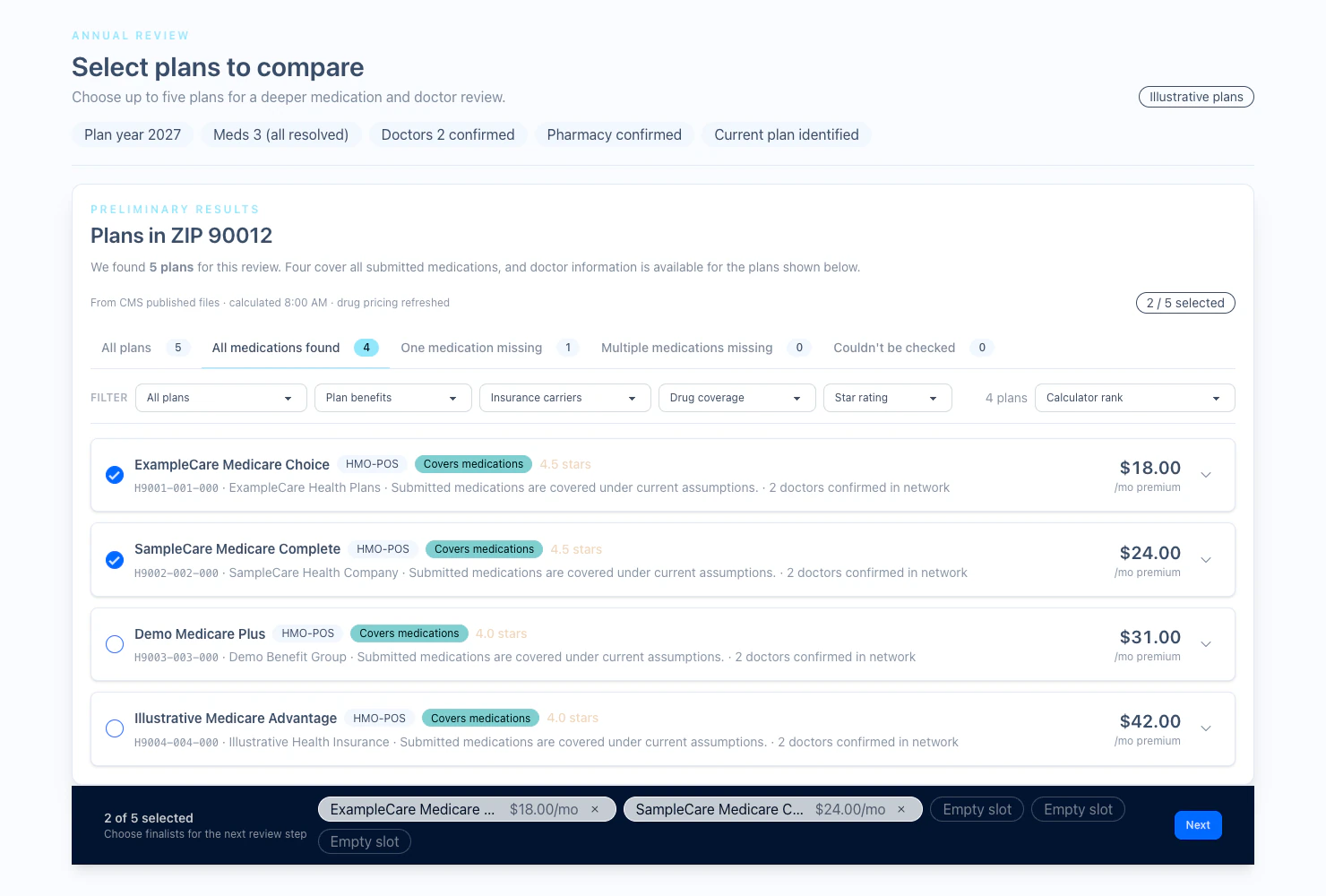
Illustrative Medicare plan selection showing medications, doctors, plan filters, and options for licensed-agent review
Illustrative plan-review view. Plans, pricing, coverage, and source availability vary by location, plan year, and confirmed client facts.

One broad Medicare quoting destination

Start with the product line. Keep one client history.

Each quote path answers a different question. Agent Workspace keeps those paths connected without pretending that every product, state, or source works the same way.

01 / Medicare Advantage + MAPD

Compare available plan options with the client facts in view

Use the applicable plan set with confirmed medications, pharmacy, doctors, coverage, and service-area details. Keep open questions visible for licensed-agent review.

See the Medicare Annual Review workflow

02 / Standalone Part D

Carry prescription details into the drug-plan conversation

Review Part D options from the same account used for the client record, Scope of Appointment, annual review, documents, and follow-up.

See Part D and Medigap quoting

03 / Medicare Supplement

Compare available Medigap rates for the case

Review plan letter, carrier, rate class, effective date, and premium estimates in supported states after identifying the applicable enrollment or underwriting path.

Explore Medicare Supplement quoting

From quote to next action

The quote is one step in the client workflow

Preserve the context around the comparison and keep the final submission boundary explicit.

  1. 01

    Start with the client

    Keep location, coverage timing, medications, pharmacy, doctors, and current coverage attached to the working record.

  2. 02

    Open the right quote path

    Move into Medicare Advantage including MAPD, standalone Part D, or Medicare Supplement workflows where the product and source data are available.

  3. 03

    Compare the relevant evidence

    Review costs, coverage details, medication results, provider evidence, or Supplement rates without hiding unavailable or unresolved information.

  4. 04

    Continue through the approved process

    Use the carrier, FMO, or approved enrollment pathway required for final verification and submission, then keep the supporting work with the client.

Illustrative product proof

See the comparison, not just a feature claim

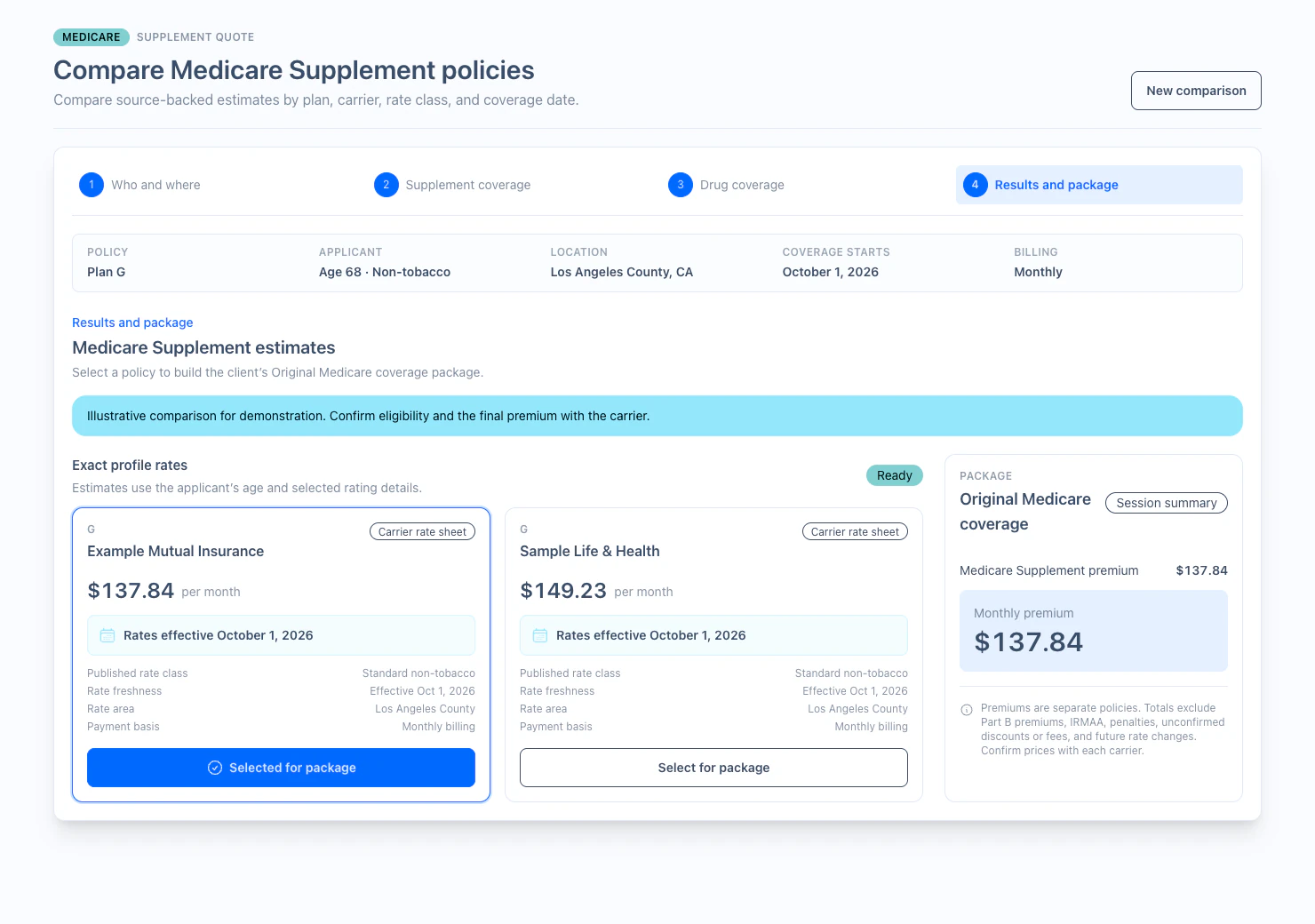
Illustrative Medicare Supplement quote comparison with plan letter, carriers, effective date, rate class, and premium estimates
Medicare Supplement comparison: plan letter, carrier, rate class, effective date, and estimated premium stay visible for the case.
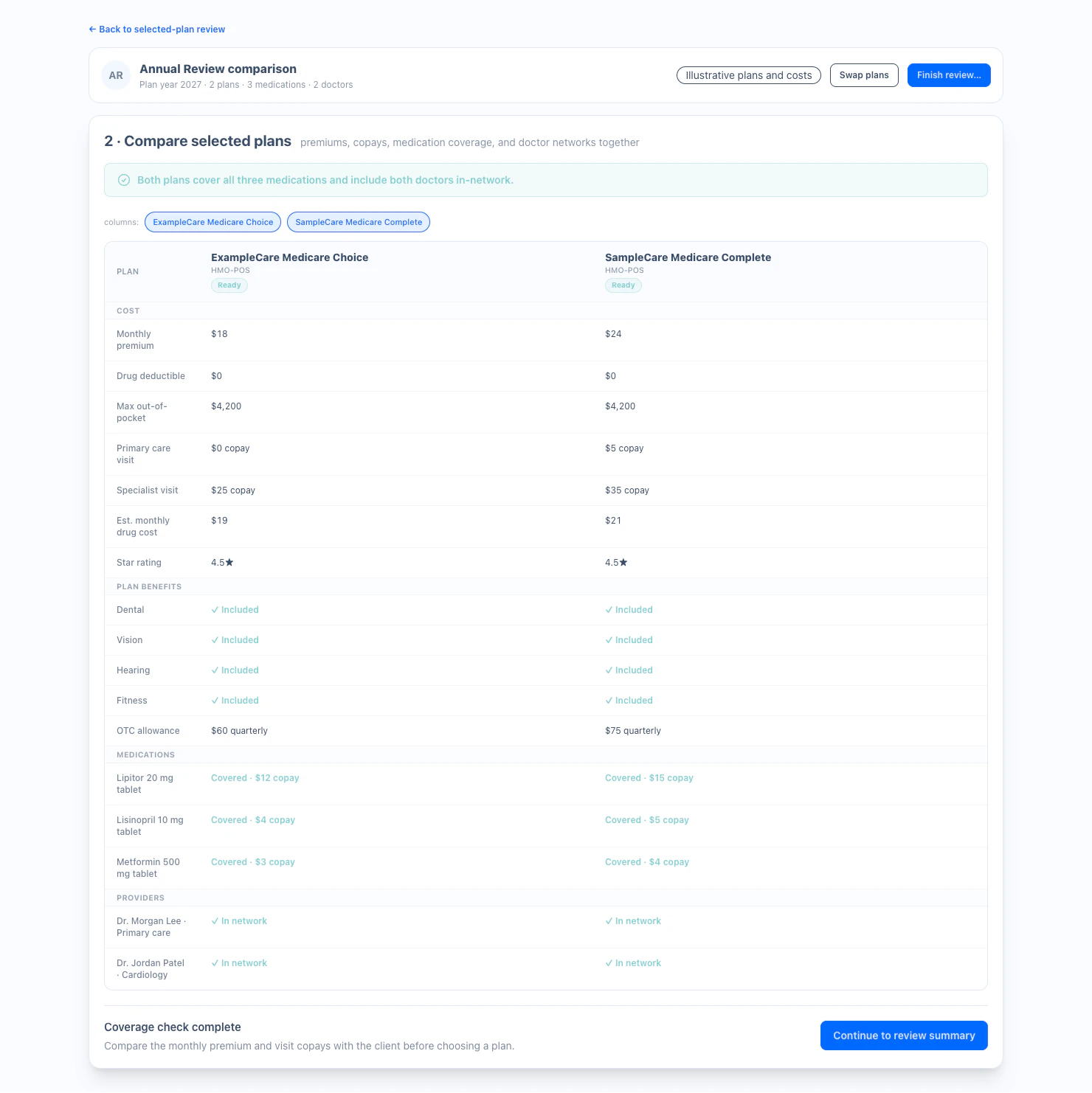
Illustrative Medicare plan comparison with premiums, visit costs, benefits, medications, and doctor-network evidence
Plan-review comparison: costs, benefits, medications, doctors, and unresolved evidence stay together for licensed-agent review.

A clear system boundary

Quoting supports the recommendation. Approved systems complete the submission.

01 / Agent Workspace supports

Client records, SOAs, medications, doctors, available plan evidence, quote comparison, notes, and follow-up.

02 / The licensed agent decides

The agent verifies current facts, explains tradeoffs, and determines the appropriate next step with the client.

03 / Approved pathways submit

Carrier, FMO, and approved enrollment platforms remain required where applicable for final verification and submission.

Included in Agent Workspace

Medicare quoting is part of the $29.99 workspace

Use the quoting workflows with CRM, electronic SOA, Annual Review, recorded business calls, an agent website, educational events, and searchable records.

Complete individual Agent Workspace

$29.99/month

The first 30 days are $0. A card is required at signup but is not charged during the trial.

Start Your 30-Day Free Trial

Cancel before the first charge if the Workspace is not a fit.

Connected workflow comparison

Compare Medicare plans without losing the client context

Client context

Separate:Re-enter the case in separate quote tools

Workspace:Quote work stays beside CRM, SOA, review evidence, and follow-up

Medicare Advantage + MAPD

Separate:Plan list separated from the annual client workflow

Workspace:Client-confirmed facts and plan evidence remain connected where available

Standalone Part D

Separate:Move prescription details to another disconnected account

Workspace:Continue the prescription conversation from the same workspace

Medicare Supplement

Separate:Use a separate rate site without the client record

Workspace:Compare available rates in supported states beside the client workflow

Enrollment submission

Separate:A quote tool may blur preparation and submission

Workspace:Clear handoff to the required carrier, FMO, or approved enrollment platform

Medicare quoting FAQ

Clear answers before you run a case

Which Medicare product lines can agents quote in Agent Workspace?

Agent Workspace supports Medicare Advantage including Medicare Advantage Prescription Drug (MAPD), standalone Part D, and Medicare Supplement quoting workflows where available. Availability varies by product, state, service area, plan year, and source data.

Does Medicare quoting software submit the enrollment?

No. Agent Workspace supports quoting, comparison, review preparation, documentation, and follow-up. Final verification and enrollment submission continue through the carrier, FMO, or approved enrollment platform required for the case.

Can agents review medications and doctors while comparing plans?

Yes, where supporting data is available. Agent Workspace can keep confirmed medications, pharmacy details, doctors, coverage information, and plan evidence together. Unknown or unavailable results remain visible for licensed-agent follow-up.

How is Medicare Annual Review different from a new quote?

A quote answers the current case question. Annual Review is a repeatable book-of-business workflow that collects client-confirmed facts, organizes available plan evidence, and helps the licensed agent prepare for the next client conversation.

Where is Medicare Supplement quoting currently available?

Medicare Supplement state availability is maintained on the dedicated Medigap quoting page. Agents should also confirm current carrier participation, rate effective dates, underwriting requirements, and final premiums before an application.

What does Medicare quoting software cost?

Medicare quoting workflows are included in the individual Agent Workspace. The first 30 days are $0 with a card required at signup. After the trial, Agent Workspace is $29.99 per month unless canceled before the first charge.

One client. The right quote path.

Keep Medicare quoting connected to the work that follows

Start with the complete individual Agent Workspace for 30 days. Continue for $29.99/month only if it fits your business.