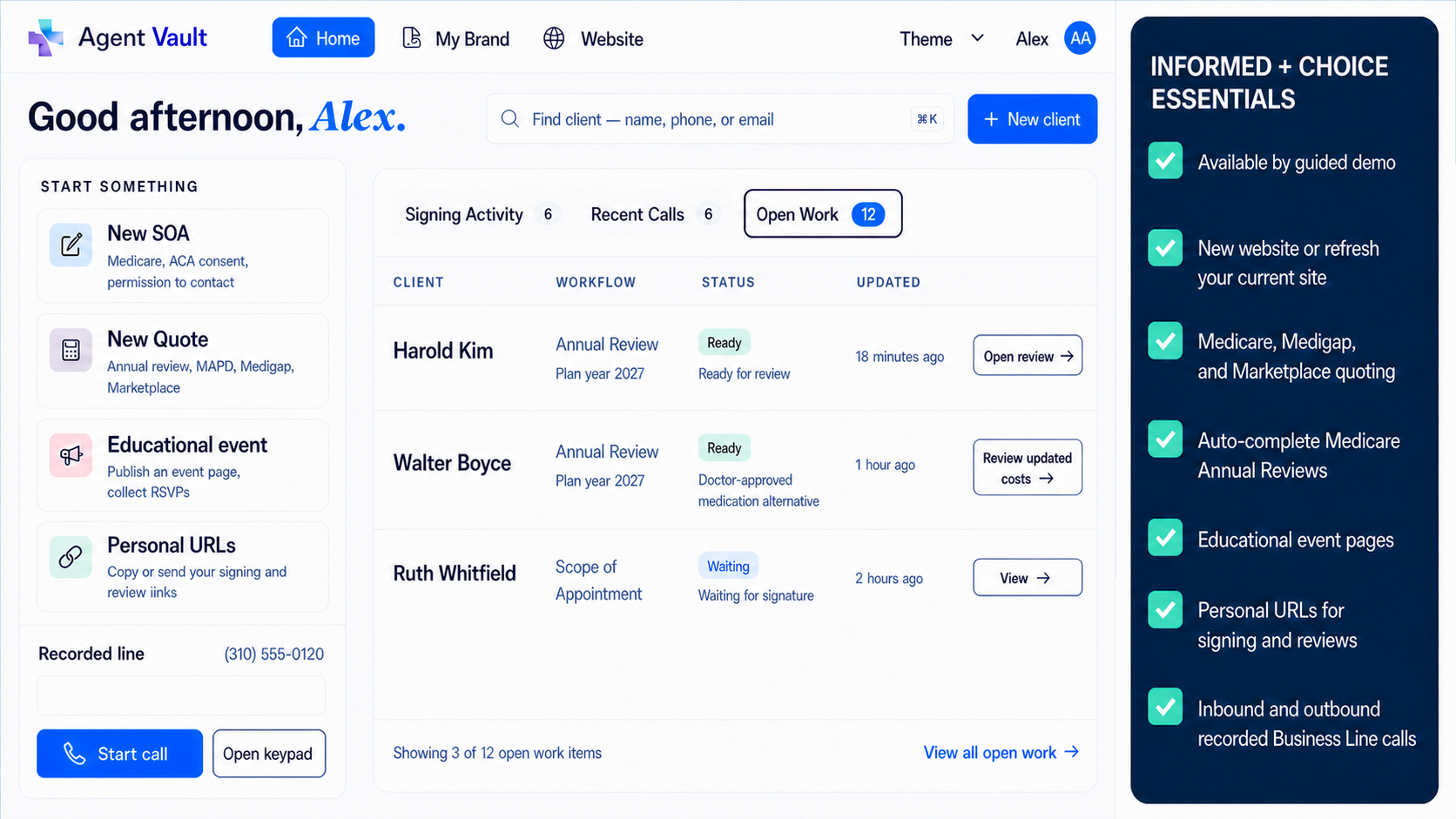
Built for licensed Medicare agents

Medicare Agent Tools for SOA, Call Recording & Record Storage

Informed + Choice helps licensed Medicare agents create, capture, store, and retrieve the records that support Medicare sales workflows.

Send electronic Scope of Appointment forms by text or email. Use a recorded business line for telephone SOA, voice signature workflows, and telephonic enrollment records. Store call recordings, SOAs, uploaded files, and supporting sales documents in one agent-controlled vault.

Use your existing quoting, CRM, carrier, FMO, and enrollment tools. Use Informed + Choice to keep the compliance record layer organized and portable.

Electronic SOATelephone SOAVoice signature workflowsMedicare call recordingTelephonic enrollment recordsSecure record vaultMultilingual formsExportable records

Built for licensed agents using their approved scripts, disclosures, carrier procedures, state recording notices, and enrollment workflows.

Medicare record layer

SOA + calls + vault

Portable

SOA captured

Electronic link or recorded telephone workflow

Call recorded

Business Line + Vault workflow

File stored

SOAs, recordings, notes, uploaded documents

Record retrieved

Search, download, export when needed

Agent-controlled vault

Keep the compliance record layer beside your sales stack.

Workflow paths

Choose the Medicare workflow you need today

Start with the workflow that solves your immediate problem. Add the rest as your process grows.

Medicare call recording and secure record storage

Recorded Business Line + Vault

Get a dedicated recorded business line with automatic call recording and secure vault storage for Medicare sales calls, telephone SOA workflows, voice signature records, telephonic enrollment calls, and supporting documents.

  • Automatic call recording
  • Secure call recording vault
  • Telephone SOA recordkeeping
  • Voice signature workflows
  • Telephonic enrollment records
  • SOA and document storage
  • Exportable records
View Business Line + Vault

Send, sign, track, and store SOAs

Electronic Scope of Appointment

Create a private Medicare Scope of Appointment link and send it by text or email. The beneficiary can review and sign from a phone, tablet, or computer through a web-based signing workflow.

  • Send SOA links by text or email
  • Mobile-friendly signing
  • No app required for signer
  • Pending and signed status
  • Replacement SOA workflow
  • Completed records stored in the vault
Explore Electronic SOA

Recorded telephone authorization workflows

Telephone SOA & Voice Signature

When a telephone workflow is the right fit, use a recorded business line to capture a telephone Scope of Appointment, voice signature-style authorization, beneficiary acknowledgment, or enrollment-related call record.

  • Telephone Scope of Appointment
  • Voice signature-style workflows
  • Recorded beneficiary acknowledgments
  • Call records tied to sales files
  • Works with electronic SOA
  • Stored in your agent vault
View Telephone SOA Workflows

Blue Button and Part D medication context

Medicare Intake & RX Tools

When plan review requires additional context, use patient-authorized Medicare data workflows to help reduce manual intake and support cleaner plan conversations.

  • Blue Button consent workflow
  • Claims-based context
  • Part D medication history
  • Coverage identifiers
  • Plan-review preparation
  • Works upstream of quoting tools
View Medicare Intake Tools

How it fits

How the Medicare record workflow fits together

A Medicare sales workflow usually creates more than one record. Informed + Choice helps agents keep those records connected.

Step 1

Capture the SOA

Send an electronic SOA by text or email, or use a telephone SOA workflow when your process supports a recorded call.

Step 2

Handle the conversation

Use your approved scripts, carrier procedures, disclosures, and enrollment workflow. If you use Business Line + Vault, the call can be recorded and stored.

Step 3

Update the scope when needed

If the beneficiary wants to discuss a different product type, create a new electronic SOA or capture the updated telephone record through your workflow.

Step 4

Store the file

Keep the SOA, call recording, telephone authorization record, telephonic enrollment record, uploaded files, and supporting sales documents in the vault.

Step 5

Retrieve or export later

Open, download, and export records when you need them for a carrier request, agency review, complaint response, compliance question, or internal file check.

Current Medicare regulations prohibit marketing additional health-related lines of plan business not identified before the appointment without a separate Scope of Appointment, and the SOA remains valid for 12 months after signature under the current eCFR text. Read 42 CFR 422.2264.

Electronic SOA

Electronic Scope of Appointment for Medicare agents

Send a private Scope of Appointment link by text or email and let the beneficiary sign from their phone.

This is not just a PDF attachment. It is a web-based signing workflow built for real Medicare sales situations: phone appointments, office meetings, field visits, educational event follow-up, and conversations where the product scope changes.

Agents can create the SOA, send the link, track whether the form is pending or signed, and store the completed record in the vault.

Send it faster.

Get it signed from the field.

Keep the record under your control.

Explore Electronic Scope of Appointment
Send SOA links by text or email
Beneficiary signs from a phone, tablet, or computer
No app required for signer
Pending and signed status
Replacement SOA workflow when product scope changes
Completed SOAs stored with related records
Exportable files

Telephone workflow

Telephone SOA and voice signature workflows

Some Medicare workflows happen by phone.

When your process supports a telephone Scope of Appointment or voice signature-style workflow, a recorded business line can help you capture the call and store the recording with the related Medicare sales record.

Use your approved script and required disclosures. Then keep the telephone SOA, voice signature record, call recording, enrollment-related file, and supporting documents together in the vault.

View Telephone SOA and Voice Signature Workflows

Use this for

Telephone Scope of Appointment records
Voice signature-style authorizations
Recorded beneficiary acknowledgments
Medicare sales call records
Telephonic enrollment-related calls
Follow-up calls where product scope needs to be documented

Medicare call recording

Medicare agent call recording with secure vault storage

Recording the call is only the first step. Agents also need a practical way to store the recording, connect it to the right client file, retrieve it later, and export it if their workflow changes.

Business Line + Vault gives licensed agents a dedicated recorded business line with automatic call recording and secure vault storage.

Use it for Medicare sales calls, telephone SOA workflows, voice signature records, telephonic enrollment-related calls, and supporting documents.

CMS's CY2027 final rule changes Medicare marketing and sales call retention to a 6-year framework, with audio required for the first 3 years and audio or complete and accurate transcripts permitted for years 4-6. Enrollment records remain subject to separate retention requirements. Read the CY2027 final rule.
Dedicated recorded business line
Automatic call recording
Call recordings stored in your vault
SOAs and call recordings together
Telephonic enrollment record storage
Off-season storage option
Exportable recordings and documents
Works alongside your existing CRM, quoting, and enrollment tools

Telephonic enrollment

Telephonic enrollment record storage

When telephonic enrollment is available through your approved enrollment process, the enrollment call record should not live in a disconnected phone dashboard.

Use Business Line + Vault to capture and store enrollment-related call records with the related SOA, plan documents, uploaded files, and supporting sales records.

The goal is simple: the call and the supporting file should stay together.

Informed + Choice supports the recordkeeping workflow. Agents remain responsible for using the scripts, disclosures, notices, and enrollment procedures required for their approved process.

Record enrollment-related calls through your business line
Store the call with the related SOA
Keep plan documents and supporting files together
Connect telephone records to the client file
Retrieve recordings for review or dispute response
Export recordings and documents if your workflow changes

Agent Compliance Vault

One Medicare record vault for SOAs, calls, and sales documents

Medicare records are easy to scatter. One SOA may be in email. A call recording may be in a phone system. An enrollment note may be in a CRM. A supporting document may be in Google Drive. A signed form may be inside an old FMO or carrier tool.

The Agent Compliance Vault gives licensed agents one place to organize the records that support Medicare sales workflows.

Store electronic SOAs, telephone SOA records, voice signature records, call recordings, telephonic enrollment records, uploaded documents, historical PDFs, and supporting sales files in one account.

Searchable storage

Keep SOAs, call recordings, and documents organized so they are easier to retrieve later.

Related records together

Store the call recording with the SOA, enrollment-related file, uploaded documents, and sales notes.

Historical imports

Upload older SOAs, PDFs, call recordings, and supporting files so prior records are not stranded.

Exportable records

Download and export your files if you change CRMs, agencies, FMOs, phone systems, or workflows.

Agent-controlled account

Keep your long-term records under your account instead of depending entirely on a carrier, FMO, CRM, or phone vendor.

Explore Agent Compliance Vault

Medicare intake

Medicare intake and RX tools when they fit your workflow

Some agents also need better intake data before plan review.

When appropriate, Informed + Choice can support patient-authorized Medicare data access so agents can reduce manual data entry and start plan conversations with cleaner coverage and medication context.

Use these tools when they help your process. Keep the core workflow simple: capture the record, store the record, and retrieve the record when needed.

Use Medicare Intake Tools
Blue Button consent workflow
Patient-authorized access
Claims-based context
Part D medication history
Coverage identifiers
Plan-review preparation
Works upstream of your existing quoting and enrollment tools

Multilingual forms

Multilingual signer-facing forms for Medicare workflows

A clearer signer-facing form experience can reduce confusion and help beneficiaries complete the record more smoothly.

Informed + Choice supports multilingual signer-facing form workflows for Medicare SOA and related agent documentation. Agents can send private links while the beneficiary reviews the form experience in a supported language.

Platform dashboard available in English. Signer-facing form workflows support selected languages.

View Multilingual Forms
Signer-facing forms in supported languages
Useful for multilingual households
Private links by text or email
Mobile-friendly signing
Completed records stored in the vault
Medicare and ACA form support in one account

Independent-agent control

Your clients. Your records. Your vault.

Independent Medicare agents often use multiple systems: carrier portals, FMO tools, quoting platforms, enrollment systems, CRMs, phone vendors, email, and file storage.

Those tools can be useful, but your long-term compliance records should not be trapped in a system you may stop using.

Informed + Choice gives agents a standalone record layer for the files that support their book of business.

Use your existing tools for quoting and enrollment.

Use Informed + Choice to keep the record.

Explore SOA Vault
No CRM bloat
No FMO lock-in
No scattered call recordings
Store SOAs and call recordings together
Works with your existing Medicare sales tools
Export records if your workflow changes
Keep access during the off-season

Pricing preview

Simple pricing for Medicare agent workflows

Start with the workflow you need now. Add the recorded line when call recording becomes part of your process.

Business Line + Vault

$39.99/month

For agents who want a dedicated recorded business line with automatic call recording and secure vault storage.

  • Dedicated business line
  • Automatic call recording
  • Electronic SOA storage
  • Telephone SOA / voice signature records
  • Telephonic enrollment record storage
  • Call recordings stored in the vault
  • Uploaded sales documents
  • Record export
  • Cancel any time
  • 30-day money back guarantee
Start Business Line + Vault

Vault Only

$9.99/month

For agents who want electronic forms, record storage, historical uploads, or off-season access without keeping the recorded line active year-round.

  • Electronic Scope of Appointment workflow
  • Stored SOAs and uploaded documents
  • Stored call recordings
  • ACA consent and eligibility review records
  • Historical imports
  • Record export
  • Off-season flexibility
  • Cancel any time
Start Vault Only

AEP preparation

Prepare your Medicare workflow before AEP

AEP gets busy quickly. The agents who are ready before the season starts usually have a cleaner process for SOAs, call recording, enrollment records, document storage, and record retrieval.

For CY2027, CMS finalized removal of the 48-hour waiting period between SOA completion and a personal marketing appointment, while keeping the requirement that the SOA be agreed upon and recorded before the appointment. CMS also explained that removing the delay allows beneficiaries to learn about plan products in real time rather than coming back 48 hours later.

That makes the workflow even more important: agents still need a practical way to capture the SOA, update the scope when needed, record telephone workflows, and keep the file organized.

Set up your Medicare record workflow

Always follow current CMS rules, carrier guidance, state recording-consent laws, agency procedures, and the requirements that apply to your operating period. Read the Federal Register final rule.

Resources

Medicare agent resources

Use these pages to go deeper into each workflow.

Marketing Call vs. Enrollment Recording

Learn how CY2027 separates Medicare marketing and sales call retention from telephonic enrollment record retention.

Medicare enrollment recording retention

Carrier-Neutral Scope of Appointment

Capture the SOA before the final carrier recommendation is clear, then retain, upload, attach, or produce the record based on the receiving carrier workflow.

Carrier-neutral SOA workflow for Medicare agents

Call Recording for Insurance Agents

See how a recorded business line, automatic call recording, and secure vault storage fit Medicare and ACA sales records.

Call recording for insurance agents

State Call Recording Laws

Compare one-party and all-party consent rules for recorded insurance calls in California, Florida, Texas, New York, Pennsylvania, Massachusetts, Illinois, and Washington.

State call recording laws for insurance agents

Off-Season Record Storage

Keep access during the off-season to stored SOAs, call recordings, ACA records, uploaded documents, historical files, and exportable records.

Keep access during the off-season

ACA Consent Recordkeeping Guide

Understand consumer consent, eligibility application review documentation, HealthCare.gov records, and the 10-year Marketplace retention workflow.

ACA consent documentation guide for agents

CY2027 Scope of Appointment Rule Changes

Review the 2027 final-rule changes for SOA timing, educational events, TPMO disclaimer timing, and Medicare call retention.

CY2027 Scope of Appointment rule changes

Federal Marketplace rules require agents and brokers assisting through Federally-facilitated Exchanges to document eligibility application review and maintain those records for at least 10 years; the regulation also describes electronic signatures and audio-recorded verbal confirmations as examples of acceptable record-producing actions. Read 45 CFR 155.220.

FAQ

Medicare Agent Tools FAQ

What Medicare agent workflows does Informed + Choice support? +

Informed + Choice supports electronic Scope of Appointment, telephone SOA, voice signature workflows, Medicare call recording, telephonic enrollment record storage, uploaded sales documents, Blue Button intake, Part D medication context, and secure vault storage for agent records.

Can I send a Medicare SOA by text or email? +

Yes. Agents can send a private electronic SOA link by text or email. The beneficiary can open the link, review the form, and sign from a phone, tablet, or computer.

Is the electronic SOA just a PDF? +

No. The electronic SOA workflow is a web-based form experience. The signed record can be stored in your vault with related call recordings and documents.

Can I use this for telephone Scope of Appointment? +

Yes. When your Medicare workflow supports a telephone SOA, you can use a recorded business line to capture the call and store the recording with the related sales record.

What is a voice signature workflow? +

A voice signature workflow is a recorded telephone process where the beneficiary authorization, acknowledgment, or confirmation is captured on the call. Business Line + Vault gives you the recorded line and vault storage layer for that record.

Can I use the recorded line for telephonic enrollment calls? +

Yes. When telephonic enrollment is available through your approved enrollment process, you can use the recorded line to capture and store the enrollment-related call record with the related SOA and sales documents.

Are calls automatically recorded? +

Yes. Calls handled through the Business Line + Vault workflow are automatically recorded and stored when recording is permitted and any required notice or consent workflow is satisfied. Agents should also review state call recording laws for insurance agents.

Review state call recording laws for insurance agents.

Can I store SOAs and call recordings together? +

Yes. The vault is designed to store electronic SOAs, telephone SOA records, call recordings, telephonic enrollment records, uploaded files, and supporting sales documents together.

Can I create a new SOA if the product scope changes? +

Yes. When the beneficiary wants to discuss a different product type, you can create a new SOA or capture an updated telephone record through your workflow and store it with the rest of the file.

Does this replace my CRM or quoting platform? +

No. Informed + Choice is designed to work beside your current quoting, CRM, carrier, FMO, agency, and enrollment tools. It focuses on the compliance record layer.

What are the Blue Button and RX tools for? +

Blue Button and RX tools can help agents gather patient-authorized Medicare data, including coverage and medication context, when that information supports plan-review preparation.

Does Informed + Choice sell insurance? +

No. Informed + Choice is not an insurance agency and does not sell insurance. The platform provides software tools for licensed agents, agencies, and healthcare organizations.

Does Informed + Choice sell or share agent data? +

No. The platform is designed to store agent records so agents can retrieve them when needed. Your leads, prospects, clients, and records remain your business.

Can I export my records? +

Yes. Recordings and documents are designed to be exportable if your workflow changes.

Does this guarantee Medicare compliance? +

No software can guarantee compliance by itself. Informed + Choice provides workflow tools for recording, storing, organizing, retrieving, and exporting records. Agents remain responsible for following applicable CMS rules, carrier requirements, state recording laws, agency procedures, and approved enrollment workflows.

Before the busy season

Build your Medicare record workflow before the busy season

Send electronic SOAs. Capture telephone SOA and voice signature records. Record Medicare sales calls. Store telephonic enrollment records, uploaded files, and supporting sales documents in one agent-controlled vault.

Start with Business Line + Vault when you need automatic call recording, or start with Vault Only when you need electronic forms and record storage.

Built for licensed Medicare agents. Use your approved scripts, disclosures, state recording notices, carrier procedures, and enrollment workflows.

Start Business Line + Vault