Keep the next step with the client
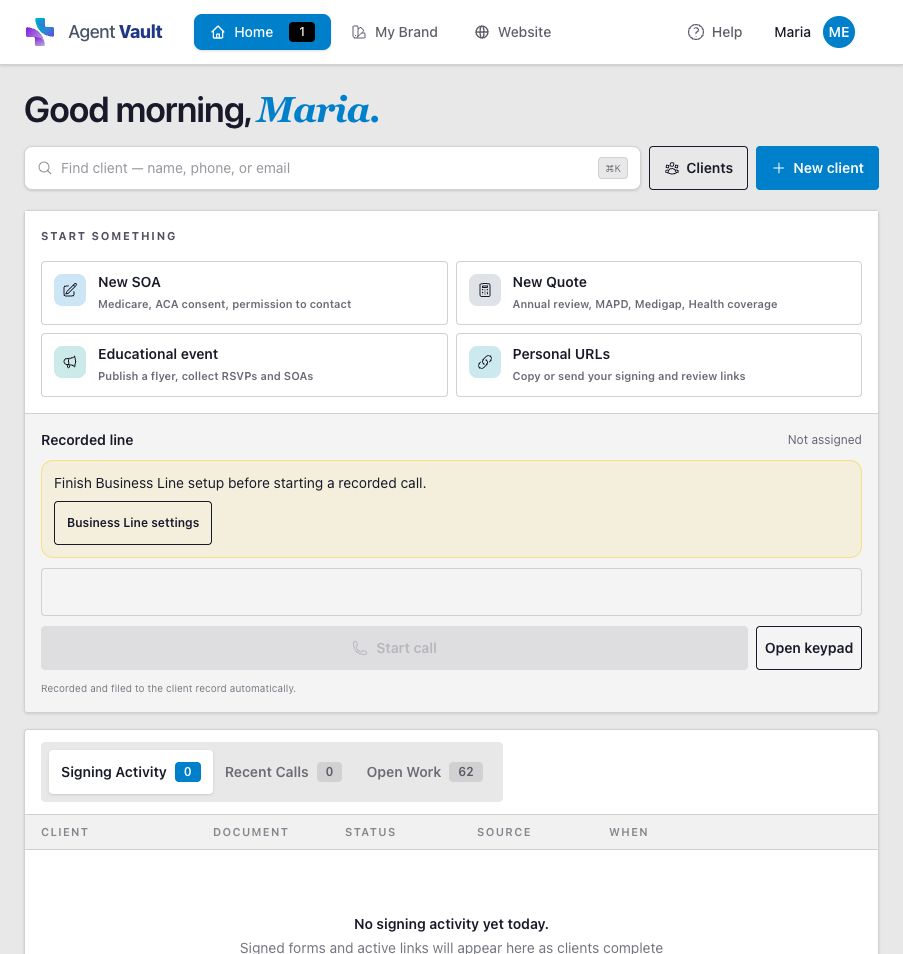
Use client records and open work to find current forms, review activity, and follow-up without reconstructing the case.
See client records and SOA trackingEssentials by Informed + Choice
Find the client. Prepare the review. Send the form. Keep your next step in view.
Start your 30-day free trialThen $29.99/month. Card required.
One trial per NPN.
A client task, from start to finish
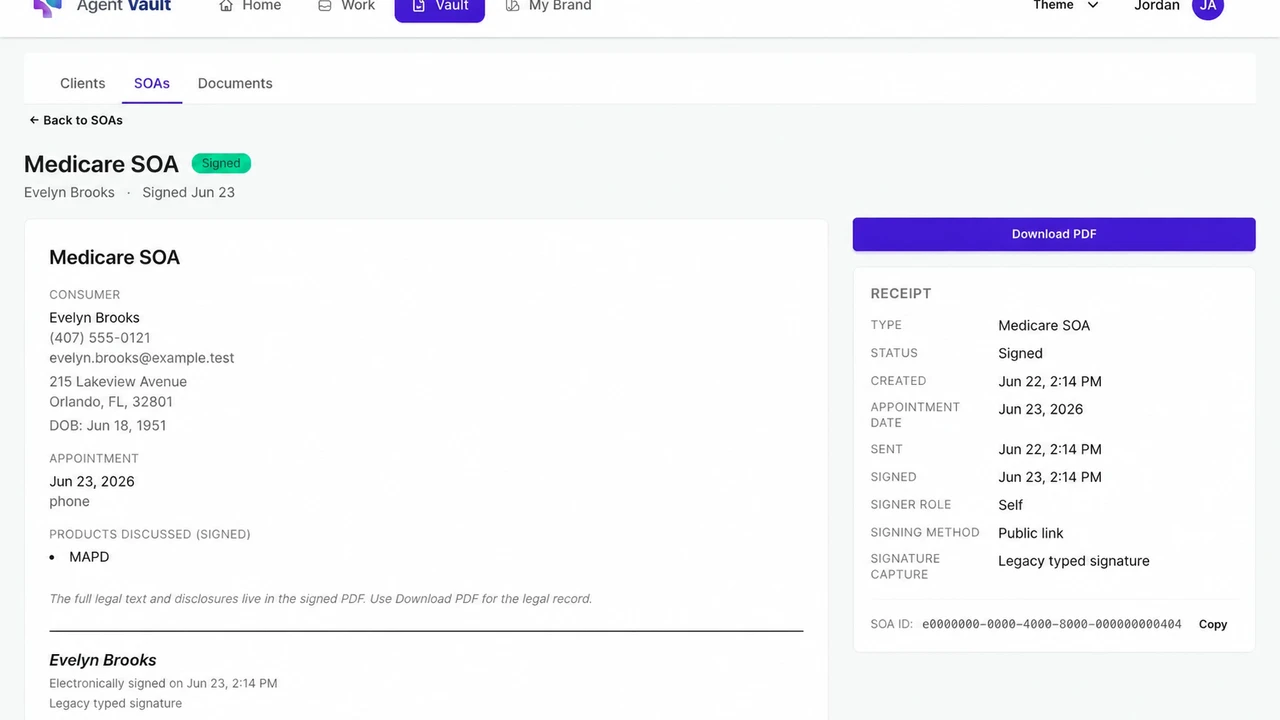
Here is one workflow inside Essentials. These product screens use a fictional client, Evelyn Brooks, to show where the work and completed record appear.
Create a client-specific Scope of Appointment request and share its signing link by text or email. The client reviews and signs on their own device.
Return to the client record to see the SOA work and its status. Check completion before moving to the next step in your appointment process.
Find the completed SOA, review its receipt, and download the PDF when you need the record.
The signing workflow is also available in the focused Electronic SOA subscription. Essentials adds the broader client workspace.
See SOA tracking inside the client recordThe rest of your client work
Essentials is the subscription. Agent Workspace describes the connected tools. You will see Agent Vault in the app where you manage client records and documents.
Use client records and open work to find current forms, review activity, and follow-up without reconstructing the case.
See client records and SOA trackingMake outbound calls in the app and answer incoming calls in the app or with included cell backup. Review permitted recordings and link calls to the correct client.
See calling, recording, and setupCollect confirmed client information and review available plan evidence, costs, and tradeoffs. Annual Review supports your assessment; the licensed agent makes the decision with the client.
Explore Medicare Annual ReviewPublish an agent website or educational event page. Share a link or QR code and collect inquiries or RSVPs for follow-up.
See website and event toolsContinue using carrier, FMO, and approved enrollment platforms where required. Quoting and review availability depend on the product, service area, plan year, and source data. Recording follows the applicable call policy, notice, and consent requirements.
Review all Essentials inclusions and limitationsCompare your options
Essentials is the connected workspace. Electronic SOA is a focused subscription. Agency access starts with a conversation about your organization.
$29.99/month
After a 30-day free trial. Card required at checkout. One trial per NPN. Monthly subscription.
$9.99/month
First payment due at secure checkout. No introductory trial.
Scoped with your team
Separate agreement and rollout. Pricing depends on your organization’s requirements.
Calling is part of Essentials: 100 calling minutes during the trial; 1,500 minutes per month on the paid plan. Use the phone on its own or with the rest of the workspace at the same subscription price. Review calling and setup details.
Before you start
Have your login email, agent profile information, National Producer Number (NPN), and payment card ready. Registration takes you through Account, Profile, and Payment.
Essentials is $29.99/month after the 30-day free trial. One trial per NPN. Cancel before the first charge if you decide it is not a fit.
Ask about setup, billing, or cancellationSet up your login, provide your professional details, and continue to payment for the Essentials trial.
For forms, set up your agent details and send an SOA link. For calling, activate your business number and allow microphone access in your browser. Ask support to confirm portability before planning to move an existing number.
After a client signs, find the completed SOA and download its PDF. If you are evaluating calling, review a permitted recording and link the call to the correct client.
Informed + Choice is the software provider. Essentials is the subscription to the connected Agent Workspace. Agent Vault is the app name you will see during registration and in the client-record and document tools. These names do not mean you need three subscriptions.
Essentials is $29.99/month after a 30-day free trial, with monthly renewal until you cancel. A card is required at checkout and there is one trial per NPN. Cancel before the first charge if you do not want to continue. Contact support if you need help with billing or cancellation.
Essentials is $29.99/month after a 30-day free trial. Card required at checkout; one trial per NPN. The trial includes 100 calling minutes; paid Essentials includes 1,500 calling minutes per month. Make outbound calls with your browser microphone and answer incoming calls in the app. Incoming cell forwarding is included with Essentials: turn on cell backup to ring your saved cell number too.
Ask support to review your existing number and the requirements before planning a transfer. Number portability and timing must be confirmed; there is no self-service porting checkout.
Yes. Share a personal or client-specific SOA link by text or email. The client can review and sign in a web browser on a phone, tablet, or computer. The signer does not need to install an app.
Continue using carrier, FMO, and approved enrollment platforms where required. Essentials organizes the client record and supporting work around those systems. Quoting and Annual Review depend on available source data, plan year, product, and service area. The licensed agent reviews the evidence and makes the plan decision with the client.
Completed SOAs have a PDF download, and document and recording workflows support retrieval and export. Record retention and access after cancellation follow your subscription terms; storage duration alone does not guarantee continued account access.
Review the subscription and record-retention terms or contact our team about your setup.
Explore sending, mobile signing, completion status, and record retrieval.
Understand the two documentation tasks and the workflows that support them.
Review the requirements and source references that apply to your calling workflow.
Working with a provider organization? Explore medical provider tools.
Start with a client record, an SOA, or your business line. Follow the task through to a result you can retrieve.
Start your 30-day free trial$29.99/month after the trial. Card required at checkout. One trial per NPN.