
Quick answer
The best AEP call recording setup for independent Medicare agents is a dedicated recorded business line connected to a compliance vault. It should handle recording notice or consent, keep calls with SOAs and enrollment-related records, and make the file exportable later.
AEP call recording is not just a phone feature. It is a workflow problem that touches state recording consent, Medicare record retention, SOAs, enrollment evidence, document storage, and retrieval.
During Medicare Annual Enrollment Period, independent agents have to move quickly. Medicare Open Enrollment runs from October 15 through December 7, and Medicare.gov explains that coverage changes generally start January 1 when the plan receives the request by December 7.
That short window creates a very specific operational problem.
An AEP call may include a recording notice, TPMO disclaimer, Scope of Appointment, plan comparison, provider and prescription review, enrollment discussion, follow-up documents, and long-term record storage. The agent may be licensed in more than one state. The beneficiary may be calling from a different state than the area code suggests. The plan review may happen on Zoom, while the enrollment discussion happens by phone.
So the real question is not simply:
Can this tool record calls?
The better question is:
Can this setup help an independent Medicare agent record the right calls, handle state recording consent, keep CMS-required evidence, store SOAs and enrollment records, and retrieve the file later?
That is where the differences between a personal phone, Zoom-style meeting tool, regular VoIP provider, FMO platform, and Agent Workspace become much clearer.
The practical problem: CMS may require recording, but state law controls how recording starts
Medicare agents are dealing with overlapping requirements.
First, CMS has Medicare-specific recording and retention expectations. In the Contract Year 2027 final rule, CMS finalized a six-year retention framework for Medicare marketing and sales calls. For the first three years, the record must be maintained in audio format. For years four through six, the record may be maintained as audio or as a complete and accurate transcript. CMS also confirmed that all marketing and sales calls, including the audio portion of calls conducted through web-based technology, must be recorded and retained in their entirety for at least six years.
Second, state call recording laws can affect how the call may be recorded. Some states allow participant recording. Some states require an announcement or disclosure. Some require consent from all parties before recording starts. The harder practical issue is that the agent and beneficiary may be in different states, and the beneficiary’s location may not be obvious from the phone number.
That is the conflict agents feel during AEP:
CMS expects Medicare marketing, sales, and enrollment workflows to be properly recorded and documented. State recording law may affect whether the call can be recorded silently, after a disclosure, or only after affirmative consent.
A regular phone recorder does not solve that conflict. It may capture audio, but it usually does not decide whether the call needs an announcement, affirmative consent, or a stricter state-law path.
The recorded business line for Medicare agents inside Agent Workspace is designed around that gap. Its Recording Jurisdiction Engine helps determine whether a call can record automatically, should start with a disclosure announcement, or needs affirmative consent before recording begins.
Why this is harder for independent agents who sell in more than one state
A captive call center may have a centralized compliance department, fixed scripts, supervisor review, and tightly controlled call routing. Independent agents often do not.
An independent agent may sell in Texas, Florida, Pennsylvania, Ohio, Michigan, Georgia, and California. During AEP, that same agent may receive calls from beneficiaries with mobile numbers, ported numbers, out-of-state area codes, seasonal addresses, or unclear locations.
That is where manual consent workflows break down.
It is not realistic to expect an agent, in the middle of AEP volume, to stop before every call and ask:
- Is this a participant-consent state or an all-party consent state?
- Is this a state where disclosure is enough?
- What if the beneficiary’s area code does not match where they live?
- What if I am in one state and the beneficiary is in another?
- What if I use Zoom for the plan review but the enrollment happens by phone?
- What if CMS expects the audio portion to be retained?
The best setup reduces that pressure. It does not make the agent memorize a state-by-state recording chart. It builds the recording workflow into the call path.
That is the role of the Recording Jurisdiction Engine inside Agent Workspace. It is designed to apply the stricter applicable rule and capture recording-policy evidence for the call, which is especially useful when the agent and beneficiary are in different states or when the beneficiary’s location is unclear.
For a deeper state-law page, see our guide to state call recording laws for insurance agents.
Comparing common AEP call recording setups
Option 1: Personal cell phone
A personal cell phone is the easiest setup to start with, but it is usually the weakest compliance workflow.
It may work for basic client communication, but it creates problems during AEP. Calls are mixed with personal calls. Recording may not be consistent. State consent handling is manual. SOAs and call recordings are not stored together. Exporting records can be difficult. If a carrier, agency, FMO, or regulator asks for a file, the agent may have to reconstruct the record from phone logs, email, screenshots, CRM notes, and separate enrollment systems.
Best for
Quick service calls or non-sales communication.
Weakness
Not built for Medicare call recording, consent handling, SOA storage, or audit retrieval.
AEP risk
The agent becomes the compliance system.
Option 2: Zoom, Teams, or other web meeting tools
Zoom-style calls are useful when the beneficiary wants to review plan options visually. Screen sharing can make it easier to walk through formularies, provider networks, plan comparisons, and enrollment steps.
But web meeting tools are not automatically a complete Medicare recording setup.
Zoom’s recording documentation describes recording consent disclaimers that notify participants when recording starts or when they join a session already being recorded. Zoom also states that meeting participants are notified when a meeting is being recorded, including audio prompts for participants who join by phone.
That helps with meeting consent, but it does not solve the full agent workflow:
- Where is the SOA stored?
- Is the audio portion retained according to Medicare requirements?
- Is the recording tied to the beneficiary file?
- Is the recording stored with the enrollment record?
- Can the agent export the full record?
- Does the tool know which state recording path applies?
- Does it separate a marketing or sales call from an enrollment record?
- Does it keep ACA consent or eligibility review records with the same client file?
Zoom-style meetings can be part of an AEP workflow, especially for plan review. But they are not usually the best system of record for independent Medicare agents.
Best for
Virtual plan reviews and screen sharing.
Weakness
Meeting recording is not the same as Medicare compliance recordkeeping.
AEP risk
The recording may exist, but the compliance file is scattered.
Option 3: Regular VoIP business phone providers
Regular VoIP providers are a step up from a personal phone. They can provide a business number, call routing, voicemail, call logs, and automatic or on-demand recording.
Some VoIP platforms also allow recording announcements. RingCentral, for example, describes on-demand and automatic call recording, customizable announcements, and access or download features. RingCentral’s public documentation also notes that RingEX recordings are stored for up to 90 days. Its terms acknowledge that notification and consent requirements for recording conversations vary from state to state and that some states may require prior consent of all parties.
That is helpful, but generic VoIP is still usually designed as a communications platform, not a Medicare agent compliance vault.
If you are deciding between those models, see the full business line vs. traditional VoIP comparison for insurance agents. The important distinction is no longer whether the agent can call inside an app. It is whether the phone system or the Medicare and ACA client workflow should be the center of the setup.
A regular VoIP system may record calls, but it typically does not know:
- Whether the call is Medicare marketing, sales, enrollment, ACA, service, or follow-up.
- Whether an SOA was completed.
- Whether the SOA belongs with that recording.
- Whether the enrollment portion requires separate treatment.
- Whether the beneficiary’s state requires a different recording path.
- Whether the audio must be retained for years, not days or months.
- Whether the file needs to be exported if the agent changes agencies, FMOs, CRMs, or sales tools.
Best for
General business phone service.
Weakness
Not built around Medicare and ACA agent recordkeeping.
AEP risk
The agent still has to build the compliance workflow around the phone system.
Option 4: FMO, carrier, or enrollment-platform recording tools
Some FMOs, agencies, carriers, and enrollment platforms offer recording or voice-signature workflows. These can be useful, especially when they are built into the quoting and enrollment process.
The advantage is convenience. The tool may already be connected to the enrollment workflow, carrier process, or agency compliance rules.
The downside is control.
Independent agents should ask practical questions before relying on an upline or platform as their long-term compliance record system:
- Do I control the record, or does the platform?
- Can I export the recording?
- Can I export SOAs, transcripts, consent records, and supporting documents?
- What happens if I leave the FMO?
- What happens if I change CRMs?
- What happens if the carrier or platform changes its workflow?
- Are my Medicare and ACA records in one place?
- Can I retrieve an audit packet without waiting on another organization?
The market opening for independent agents is not cheaper call recording alone. It is a more trustworthy, portable, audit-ready record system where records are not trapped inside an upline ecosystem.
Best for
Platform-specific enrollment workflows.
Weakness
Records may be tied to the platform, carrier, agency, or FMO relationship.
AEP risk
The agent may not fully control long-term access to the evidence.
Option 5: Agent Workspace
Agent Workspace is built around the actual Medicare and ACA agent workflow: an included business number for inbound and outbound calls inside the app, jurisdiction-aware recording logic, SOA storage, ACA consent storage, enrollment-related records, uploaded sales documents, and exportable recordkeeping.
Calls do not forward or bridge to the agent’s personal cell phone. Outbound calls use the browser microphone and in-app controls. Inbound calls ring inside Agent Workspace while the agent is signed in and available. If the app is closed, the call is unanswered, or the agent is already on a call, the caller can leave a voicemail in Agent Vault.
The product positioning is not simply “call recording.” The stronger promise is:
A recorded business line and compliance vault built for independent Medicare and ACA agents who need to keep calls, SOAs, consent records, enrollment records, and sales documents together.
Agent Workspace combines three pieces.
1. Recorded business line
The agent activates the business number included with Agent Workspace and places or answers calls inside the app. The line does not forward or bridge to a personal cell phone.
2. Recording Jurisdiction Engine
The system helps determine the right recording path based on the agent’s state, the beneficiary’s likely jurisdiction, interstate call issues, and stricter-state rules.
3. Compliance vault
The call recording can live with the related SOA, telephone SOA, ACA consent record, eligibility review documentation, enrollment-related record, notes, and uploaded sales documents.
Best for
Independent agents who want a dedicated Medicare and ACA call recording and compliance recordkeeping workflow.
Weakness
More specialized than a general phone system, so it is designed for agents rather than every business category.
AEP advantage
It reduces the number of separate systems the agent has to manage under pressure.
Setup comparison table
| Setup | What it does well | Where it falls short during AEP | Best use |
|---|---|---|---|
| Personal cell phone | Easy, familiar, always available | No structured consent workflow, weak record storage, mixed personal and business calls, hard to export | Basic communication, not primary AEP sales calls |
| Zoom or web meeting | Good for screen sharing and virtual plan reviews | Recording consent is meeting-based, not Medicare-recordkeeping-based; SOA and enrollment records may live elsewhere | Visual plan review, not full record system |
| Regular VoIP provider | Business number, call logs, recording options, announcements | Usually not built for Medicare SOAs, enrollment records, ACA documentation, jurisdiction logic, or long-term compliance vault storage | General business calling |
| FMO, carrier, or enrollment platform | May integrate with specific enrollment workflows | Record ownership, exportability, and long-term access may depend on the platform relationship | Carrier or FMO-specific sales workflow |
| Agent Workspace | Recorded business line, jurisdiction-aware recording, SOA/ACA/enrollment document storage, exportable records | Purpose-built for insurance agents, not a generic communications suite | Independent Medicare and ACA compliance recordkeeping |
The CMS-vs-state-law problem: what should an agent actually do?
This is the part most generic articles skip.
When CMS expects a Medicare call to be recorded, but state recording law requires notice or consent before recording, the agent should not treat those requirements as optional or choose one over the other.
The practical answer is:
Build a workflow that satisfies the state recording requirement first, then preserves the Medicare-required recording and related documentation.
For example:
- If the call is in a state where participant recording is allowed and both sides resolve to that path, the call may be recorded automatically.
- If the call involves a state where disclosure is the correct path, the setup should play the disclosure before the customer-content portion of the conversation continues.
- If the call involves a stricter all-party consent state, the setup should obtain affirmative consent before the recording begins.
- If the beneficiary’s state is unclear, the setup should avoid silent recording and use a safer disclosure-first path unless a stricter consent rule applies.
That is exactly the kind of problem the Recording Jurisdiction Engine is designed to handle. It applies stricter-state logic when the agent and beneficiary are in different states, and it avoids relying only on the agent’s own state as the answer.
For agents, the takeaway is simple: do not try to manage this with memory during AEP. Put it into the call setup.
A practical AEP setup for independent agents
Here is the setup I would recommend for an independent Medicare agent before AEP.
1. Use a dedicated recorded business line for Medicare and ACA calls
Do not make your personal cell phone the center of your AEP compliance workflow.
A dedicated business line gives you cleaner call separation, better records, more consistent recording behavior, and easier retrieval. It also makes it easier to train staff or downline agents because everyone follows the same workflow.
2. Use a jurisdiction-aware recording setup
This is especially important if you sell in more than one state.
A multi-state agent should not have to remember every call recording consent rule in the middle of AEP. The system should help decide whether the call can record automatically, needs an announcement, or requires affirmative consent.
The Informed + Choice jurisdiction engine was built for this exact issue. It classifies state recording paths, applies stricter-state logic, handles interstate or unclear-location calls more conservatively, and records audit evidence for the recording decision.
3. Keep Zoom-style meetings as a support tool, not the record hub
Use Zoom, Teams, or another meeting tool when visual review helps the beneficiary.
But do not let meeting recordings become your primary compliance archive unless you have a clear process for connecting the recording to the SOA, enrollment record, notes, and supporting documents.
For Medicare agents, the meeting is not the record. The complete file is the record.
4. Store the call with the SOA
AEP files become hard to defend when the recording is in one tool and the SOA is in another.
A better file should include:
- Call recording
- Scope of Appointment
- Telephone SOA or voice-signature-style record, when used
- Plan discussion notes
- Enrollment-related documentation, when applicable
- ACA consent or eligibility review records, when applicable
- Uploaded supporting sales documents
- Exportable record history
Agent Workspace is designed to keep calls, SOAs, ACA records, and sales documents together instead of splitting them across disconnected tools.
5. Separate marketing and sales calls from enrollment records
CY2027 did not make every Medicare record the same.
CMS reduced the marketing and sales call retention framework to six years, with audio required for the first three years and audio or complete and accurate transcript allowed for years four through six. But CMS also maintained separate enrollment record requirements, and the enrollment portion of a telephonic enrollment call serves as proof of the beneficiary’s intent to enroll.
That means agents should avoid a sloppy “everything is six years now” workflow.
A practical AEP setup should help identify what kind of record it is:
- Marketing or sales call
- Enrollment portion of the call
- SOA record
- ACA consent record
- ACA application review record
- Service or follow-up note
- Supporting sales document
If the recorded conversation turns into an MA or Part D plan change outside AEP, the file also needs the election-period basis. Use the Medicare SEP documentation workflow to keep that eligibility screen separate from the call-recording and storage question.
For more detail, see our guide to Medicare marketing call vs. enrollment recording records.
6. Make exportability part of the setup
Independent agents should not rely on any system that traps records.
Before AEP, ask:
- Can I export recordings?
- Can I export SOAs?
- Can I export enrollment-related documentation?
- Can I export ACA consent and review records?
- Can I export the full file if I change FMOs, agencies, CRMs, or phone systems?
- Can I retrieve the file years later?
This is one reason Agent Workspace includes an agent-controlled compliance record layer instead of treating call recording as a disconnected phone feature.
What to do when a beneficiary does not want to be recorded
This should be treated as an exception workflow, not the main story.
Most AEP call recording setups should be designed so recording happens smoothly after the required notice or consent step. But agents should still have a written process for the rare case where a beneficiary will not continue on a recorded call and the applicable Medicare, carrier, or state-law workflow requires a recording.
The practical guidance is:
- Do not improvise.
- Do not ignore state consent law.
- Do not complete a required recorded enrollment process on an unapproved path.
- Follow the carrier, agency, FMO, or compliance-approved alternative.
- Consider a different approved channel, such as a carrier-directed enrollment process, written or electronic workflow, or rescheduled call after the beneficiary understands the reason for recording.
The important point is that the agent should not be deciding this from scratch during a live AEP call. The exception process should be documented before AEP starts.
Best setup by agent type
Solo Medicare agent selling in one state
A regular VoIP line may be workable if the agent has a simple book of business, understands the state recording rule, stores SOAs separately, and has a reliable export process.
But even for a solo agent, Agent Workspace is stronger if the agent wants calls, SOAs, ACA records, and sales documents in one place.
Independent agent selling in multiple states
This is where Agent Workspace becomes much more compelling.
The more states an agent sells in, the harder it becomes to manually manage state recording consent rules. A multi-state agent needs a setup that can help apply the correct recording path without requiring the agent to memorize every jurisdiction.
Medicare and ACA hybrid agent
A hybrid agent needs more than Medicare call recording.
They also need ACA consumer consent and eligibility review tools, application review records, eligibility-related documentation, and a way to keep those records separate from but connected to the broader client file. This is a compliance workflow engine plus evidence vault, not merely a phone recorder.
Agency or small team
A team needs consistency.
The problem is not whether one careful agent can remember the rule. The problem is whether every producer follows the same workflow during AEP volume. Agent Workspace gives the agency a more consistent recorded-line and record-storage process.
Recommended AEP call workflow with Agent Workspace
Here is a practical workflow agents can actually follow.
Before AEP
Sign up for Agent Workspace and activate the included business number when you are ready. Configure the agent’s licensed selling states and recording preferences. Test inbound and outbound calls inside the app. Confirm that disclosure or consent prompts work where needed. Test electronic SOA delivery. Test telephone SOA or voice authorization workflows if used. Confirm that recordings, SOAs, documents, and notes land in the vault. Confirm export options.
During the call
The beneficiary calls the Agent Workspace business number, or the agent places the outbound call inside the app with the browser microphone and in-app controls. The system applies the appropriate recording path. If an announcement is required, the announcement is handled. If affirmative consent is required, the consent step is handled before recording begins. When the agent cannot answer inside the app, the inbound call goes to Agent Vault voicemail rather than a personal cell phone.
Then the agent handles the Medicare workflow: reason for the call, required disclaimers, SOA, plan discussion, provider and prescription review, enrollment steps if applicable, and follow-up documentation.
After the call
The agent stores the related records together: call recording, SOA, notes, enrollment-related documentation, ACA consent or review records if applicable, and uploaded supporting documents.
The file is not scattered across a cell phone, Zoom cloud folder, VoIP dashboard, CRM, email inbox, and carrier portal. It is organized through an Essentials record-management workflow.
Why Agent Workspace is the better AEP setup
The best AEP call recording setup for independent Medicare agents is not the tool with the most generic phone features. It is the setup that reduces the most real-world compliance friction.
Agent Workspace is designed for the problems agents actually face:
- Medicare calls need to be recorded and retained.
- State recording consent rules vary.
- Multi-state agents cannot reliably manage every rule manually during AEP.
- Beneficiary location may not always be obvious.
- Zoom-style meetings may help with screen sharing but do not solve recordkeeping.
- Generic VoIP providers may record calls but are not built around SOAs and Medicare/ACA evidence.
- FMO or carrier tools may be useful but may not give the agent independent control over long-term records.
- Agents need calls, SOAs, consent records, enrollment records, and sales documents together.
That is the core advantage: Agent Workspace is not just a call recorder. It connects the recorded business line and compliance vault to CRM, Annual Review, electronic forms, and the independent agent’s ongoing workflow.
AEP call recording checklist
Before AEP, every independent Medicare agent should be able to answer these questions.
Call setup
- Do I have a dedicated business line for Medicare and ACA calls?
- Are inbound and outbound calls routed through the same compliance workflow?
- Do I know whether calls are recorded automatically, after announcement, or after consent?
- Does the system help handle state recording consent rules?
State consent workflow
- What happens if I call across state lines?
- What happens if the beneficiary’s location is unclear?
- What happens if I sell in an all-party consent state?
- Does the system capture evidence that the required recording notice or consent step occurred?
Medicare workflow
- Can I complete and store the SOA?
- Can I store telephone SOA or voice-signature-style records?
- Can I separate marketing/sales records from enrollment records?
- Can I retain audio for the first three years where required?
- Can I manage transcripts or audio for years four through six?
Record storage
- Are recordings stored with the related SOA and documents?
- Can I upload supporting files?
- Can I search by beneficiary, date, phone number, plan year, or record type?
- Can I export the record if I change systems, agencies, or FMOs?
Off-season access matters too. Agents should confirm the approved storage scope, ongoing access, export process, and retention terms before AEP or OEP ends. Essentials is $29.99/month after a 30-day free trial. Card required at checkout; one trial per NPN.
The bottom line
AEP is not the time to rely on a patchwork call recording setup.
A personal cell phone is convenient but weak for compliance. Zoom-style meetings are useful for screen sharing but are not a full Medicare recordkeeping system. Regular VoIP providers can record calls, but they are not usually built around SOAs, Medicare enrollment evidence, ACA consent records, or multi-state recording-consent logic. FMO and carrier tools may help, but independent agents still need to think about record ownership and exportability.
Business Telephone is the focused Informed + Choice option for independent Medicare agents who want a dedicated business number for calls made and answered inside the app, permitted recording support, call history, and related record storage. Business calling is included in Essentials at $29.99/month after a 30-day free trial. Card required at checkout; one trial per NPN.
During AEP, that matters.
The goal is not just to record calls. The goal is to have the right call, recorded the right way, stored with the right documents, and retrievable when someone asks for proof.
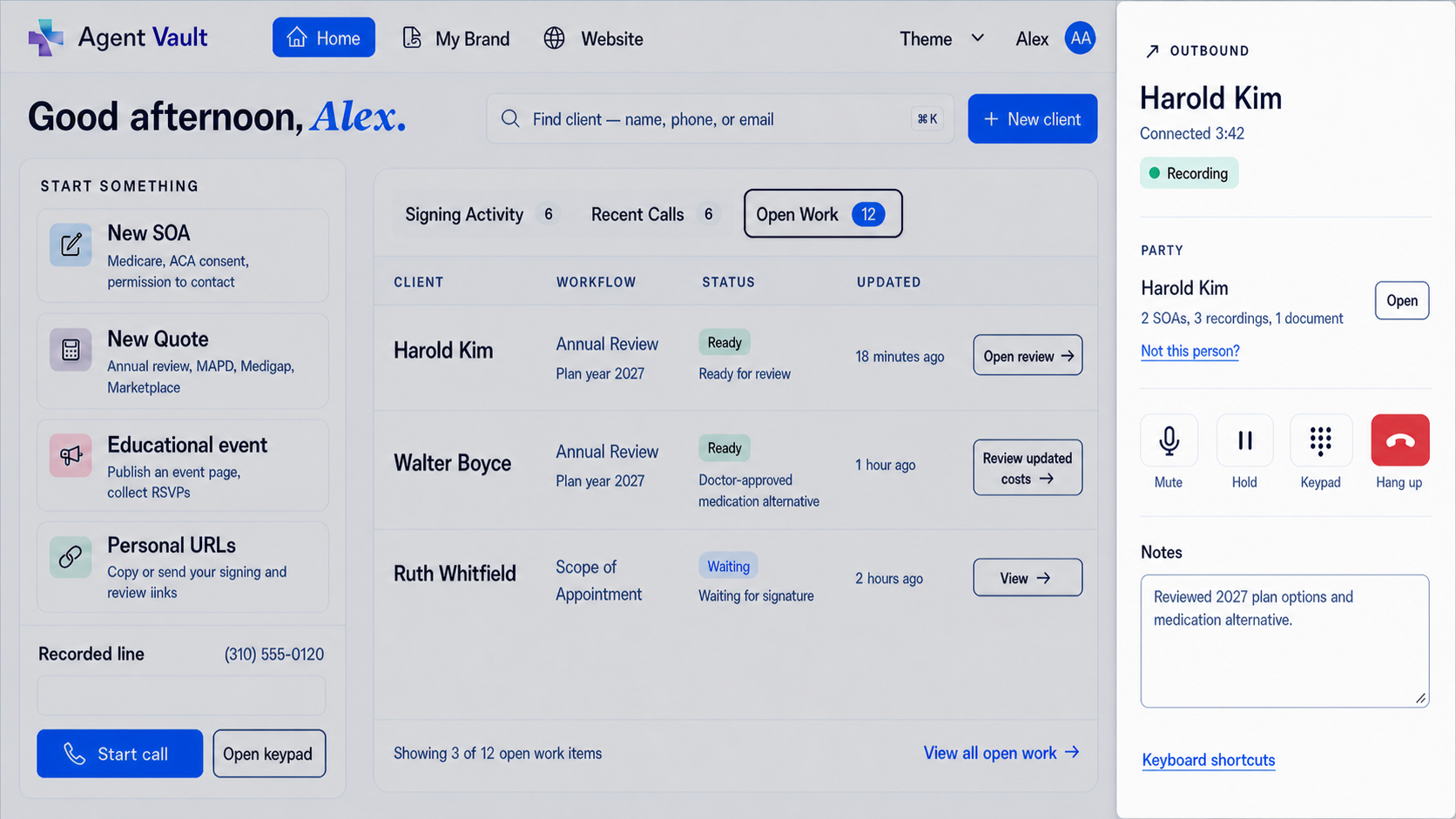
Set up the call where the client work lives
Use an in-app business line without forwarding calls to your personal cell.
Agent Workspace combines inbound and outbound app calling with the Medicare and ACA client record, permitted recordings, voicemail, notes, SOAs, consent records, Annual Review, and supporting files.
The software supports the workflow; it does not decide which calls must be recorded, the applicable retention track, state consent law, legal holds, or the approved scripts and procedures for the call.
Business calling is included in Essentials at $29.99/month after a 30-day free trial. Card required at checkout; one trial per NPN. Any included usage allowance or additional usage charge will be disclosed before purchase.
Sources
- Medicare Open Enrollment : Medicare.gov Accessed 2026-05-12.
- Federal Register, 91 FR 17384 : Contract Year 2027 Medicare Advantage and Part D final rule Accessed 2026-05-12.
- Zoom recording consent support : Zoom Support Accessed 2026-05-12.
- Zoom recording notification prompts : Zoom Support Accessed 2026-05-12.
- RingCentral call recording : RingCentral Accessed 2026-08-06.
- RingCentral Contact Center Online Terms of Service : RingCentral Accessed 2026-05-12.
- Agent Workspace : Informed + Choice
Frequently Asked Questions
What is the best call recording setup for independent Medicare agents during AEP?
The best setup is a dedicated recorded business line connected to a compliance vault. For multi-state agents, the setup should also include jurisdiction-aware recording logic so the agent does not have to manually remember every state recording consent rule during AEP.
Can Medicare agents use Zoom for AEP calls?
Yes. Zoom-style meetings can be useful for plan reviews, especially when screen sharing helps the beneficiary understand options. But web meetings should not be the agent's entire compliance recordkeeping system. Agents still need to store the call record with the SOA, enrollment-related records, notes, and supporting documents.
Is regular VoIP enough for Medicare call recording?
Regular VoIP can be enough for general business calling, but it is usually not enough for a complete Medicare agent compliance workflow. Generic VoIP systems may record calls, but they usually are not built to manage SOAs, ACA consent records, enrollment documentation, state recording logic, and long-term exportable storage together.
Why do state call recording laws matter for Medicare agents?
CMS may require Medicare marketing, sales, or enrollment calls to be recorded, but state law can control how recording starts. Depending on the state and the call path, the call may need no additional notice, a disclosure announcement, or affirmative consent before recording begins.
How does the Agent Workspace jurisdiction engine help?
The Recording Jurisdiction Engine helps determine the appropriate recording path for the call. It is designed to apply stricter-state logic when needed, avoid silent recording when the beneficiary's jurisdiction is unclear, and capture evidence of the recording policy applied to the call.
What happens when CMS recording rules and state recording consent rules seem to conflict?
The practical answer is to satisfy the state recording requirement first, then preserve the Medicare-required recording and documentation. That may mean recording automatically where permitted, playing a disclosure announcement where required, or obtaining affirmative consent where required before the recorded Medicare conversation proceeds.
What should be stored with an AEP call recording?
A strong AEP file should include the call recording, SOA, plan discussion notes, enrollment-related records when applicable, ACA consent or eligibility review records when applicable, and supporting sales documents.
Should independent agents rely only on FMO or carrier tools?
FMO and carrier tools can be useful, but independent agents should understand whether they control the records, whether files are exportable, and what happens if they change FMOs, agencies, CRMs, or enrollment platforms.
Does Agent Workspace include a CRM?
Yes. Agent Workspace includes a Medicare and ACA-specific CRM, an included business number for inbound and outbound calls inside the app, electronic forms, Annual Review, and a connected compliance vault. Calls do not forward or bridge to a personal cell phone. Agents can still use required quoting tools, carrier portals, and enrollment platforms.
What is the most important AEP setup mistake to avoid?
The biggest mistake is scattering the record. If the call is in one system, the SOA is in another, the notes are in a CRM, the enrollment record is in a carrier portal, and the supporting documents are in email, retrieval becomes the weak point.
Medicare and ACA Compliance Expert
Christian Rodgers is a Medicare and ACA compliance expert with over 30 years in the healthcare industry, having worked for some of the largest health plans in the United States. He has provided Medicare sales training to hundreds of agents in California and Florida.
Connect on LinkedIn